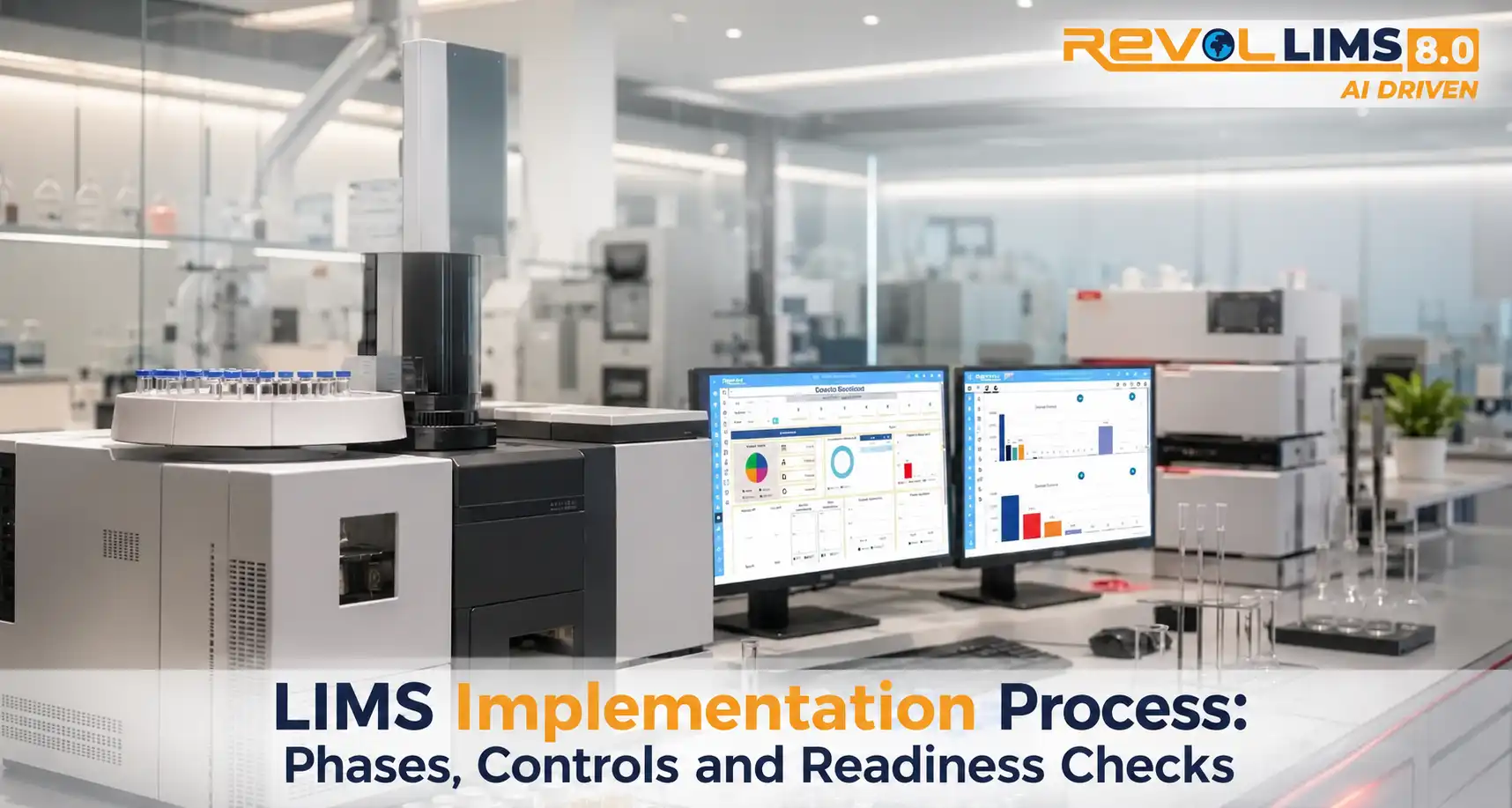
A Laboratory Information Management System (LIMS) can influence how a laboratory receives samples, assigns work, records results, reviews data and issues reports. Implementing one affects more than the IT environment. It can change procedures, responsibilities, quality controls and day-to-day decisions.
The most reliable implementations begin with a clear understanding of current processes and future requirements. They then move through system selection or configuration, data preparation, integration, verification or validation, training, deployment and ongoing improvement. The exact activities vary by laboratory type, regulatory environment, system architecture and project scope. This guide presents a practical framework, not a one-size-fits-all recipe.
Key Takeaways
- A LIMS implementation is a business, quality and technology change programme, not just an installation.
- Document current workflows and define measurable requirements before configuring the system.
- Involve laboratory users, quality assurance, IT, management and relevant external stakeholders early.
- Plan data migration, instrument interfaces, access controls, audit trails, backup and recovery as core workstreams.
- Use a risk-based testing and validation approach that fits the system's intended use and applicable requirements.
- Deploy in controlled stages, monitor performance and keep a process for support and continuous improvement.
What Is Involved When a Laboratory Adopts a LIMS?
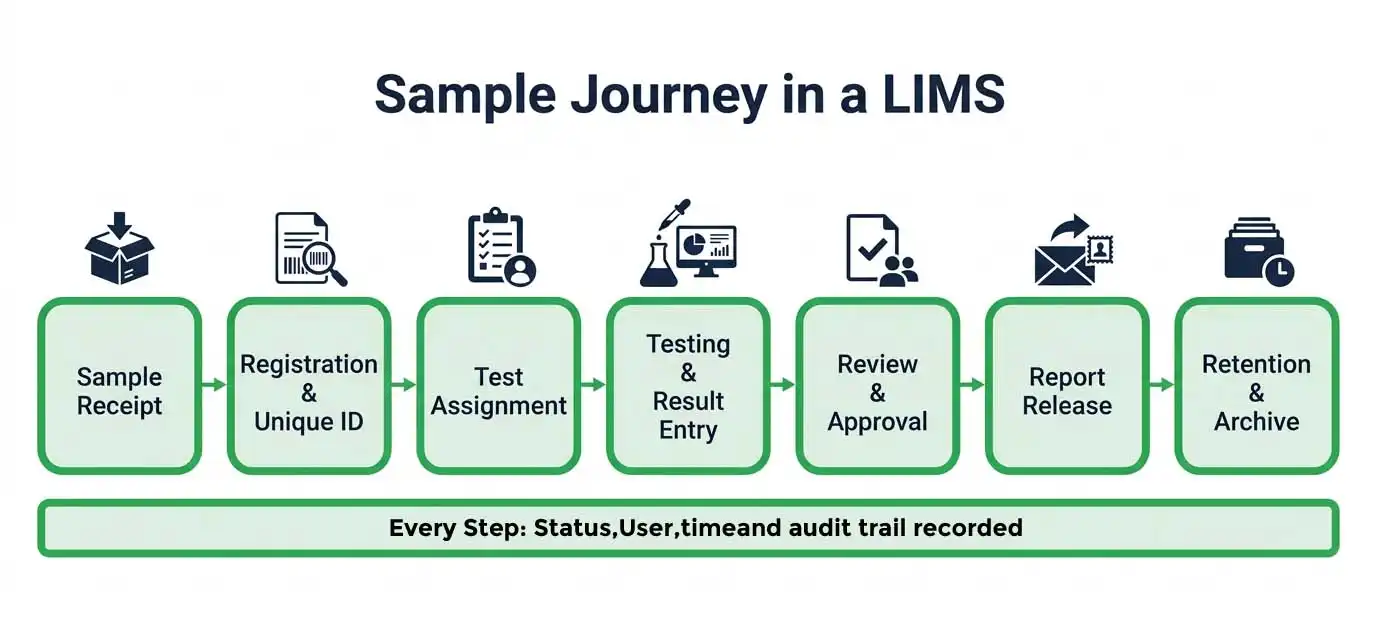
Adopting a LIMS means changing how a laboratory works, not only which software it uses. The project reshapes how samples are received, who is responsible for each decision, how results are reviewed and how records are protected. Success is measured in outcomes: reliable daily operations, traceable samples and records the laboratory can trust. A working application is only one part of that. The effort spans requirements, workflow design, data preparation, system connections, testing, staff readiness, go-live and long-term ownership.
What does a LIMS typically manage?
Depending on the laboratory's scope, a LIMS may support:
- Sample registration, identification, labelling, chain of custody and status tracking.
- Work allocation, test scheduling, methods, specifications and result entry.
- Calculations, review, approval, exception handling and report generation.
- Equipment, reagents, standards, consumables and related records.
- User roles, permissions, electronic records, audit trails and controlled workflows.
- Operational dashboards, workload visibility, trends and management reporting.
Not every laboratory needs every function. A small environmental testing facility, a pharmaceutical QC laboratory and a clinical laboratory may have different workflows, terminology, interfaces and regulatory obligations. Scope should follow the laboratory's actual activities and intended outcomes.
Why is a software installation not enough?
Installation makes software available in an environment. Implementation makes it operationally useful and controlled. A system can be installed while critical work remains unfinished. Master data may be incomplete, instrument interfaces may not be tested, staff may not understand revised procedures, and records may not be adequately protected. Implementation addresses these connected elements as one programme.
Where Do Laboratories Commonly Face Gaps?
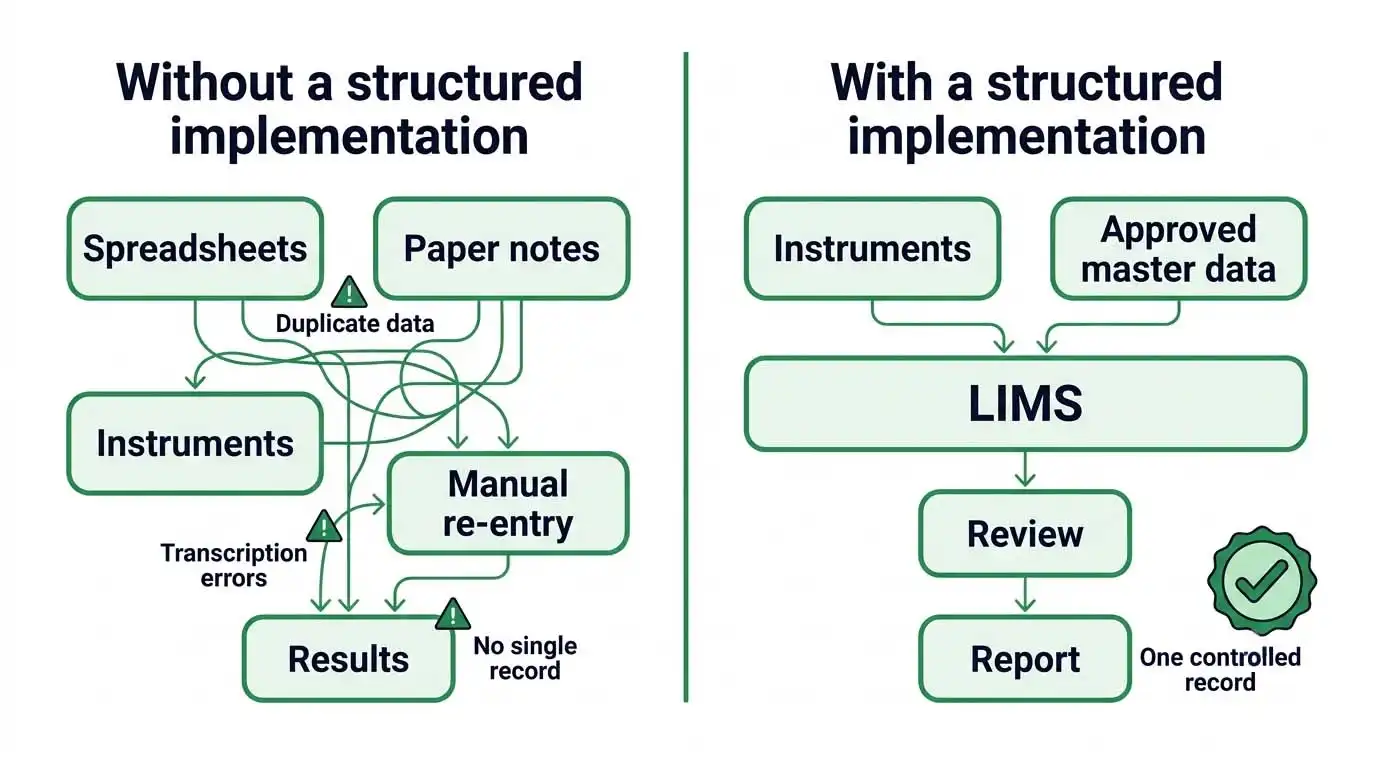 Implementation difficulties often begin before configuration. Laboratories may have undocumented workarounds, inconsistent sample identifiers, duplicate spreadsheets, unclear approval responsibilities or fragmented equipment records. If these issues are moved straight into a new system, digital workflows can reproduce old weaknesses. Early process mapping and stakeholder review expose gaps before they become expensive configuration or adoption problems.
| Common gap | Why it matters | Planning response |
|---|---|---|
| Unclear or undocumented workflows | Different staff may perform the same process in different ways. | Map the real process, identify approved variations and agree a target workflow. |
| Inconsistent master data | Duplicate tests, units, sample types or customer records can undermine reporting. | Create ownership, naming rules, approval and cleanup procedures for master data. |
| Manual transcription | Rekeying results can introduce errors and delays. | Assess instrument connectivity, import controls and independent review requirements. |
| Weak access governance | Users may have more access than their role requires. | Define role-based permissions, account lifecycle controls and periodic reviews. |
| Unplanned migration | Legacy records may be incomplete, duplicated or difficult to interpret. | Profile source data, define migration rules and reconcile migrated records. |
| Insufficient user involvement | A technically sound design may not fit bench-level work. | Include representative users in requirements, demonstrations and testing. |
| No post-launch ownership | Issues can persist and configuration can drift. | Assign system ownership, support routes, change control and review measures. |
What should be assessed before the project starts?
- Process variation across shifts, departments, sites and test disciplines.
- Existing systems and data sources, including spreadsheets, instruments and enterprise applications.
- Applicable quality standards, regulations, accreditation commitments and record-retention rules.
- Infrastructure, cybersecurity, identity management, network reliability and business continuity.
- People capacity: subject-matter experts, project leadership, training time and support resources.
The assessment should separate mandatory requirements from preferences. It should also identify decisions that need quality, regulatory, security or senior-management approval.
What Do Laboratories Need for a Successful Implementation?
A successful programme needs an agreed purpose, accountable governance, usable requirements, suitable technical foundations and evidence that the configured system works as intended. These elements should be planned together. The right level of documentation and testing depends on risk, intended use and applicable rules. Laboratories should not assume that one validation template fits every environment.
1. A defined business case and scope
Describe the operational problem the project is meant to solve. Examples include improving sample traceability, standardising workflows, strengthening review controls or reducing repeated data entry. Define what is in scope, what is excluded, which locations and departments are involved, and how success will be measured. Useful measures include sample turnaround time, rework, reporting delays, overdue tasks, data-entry corrections and user adoption. Set a baseline before go-live so later comparisons are meaningful.
2. A cross-functional project team
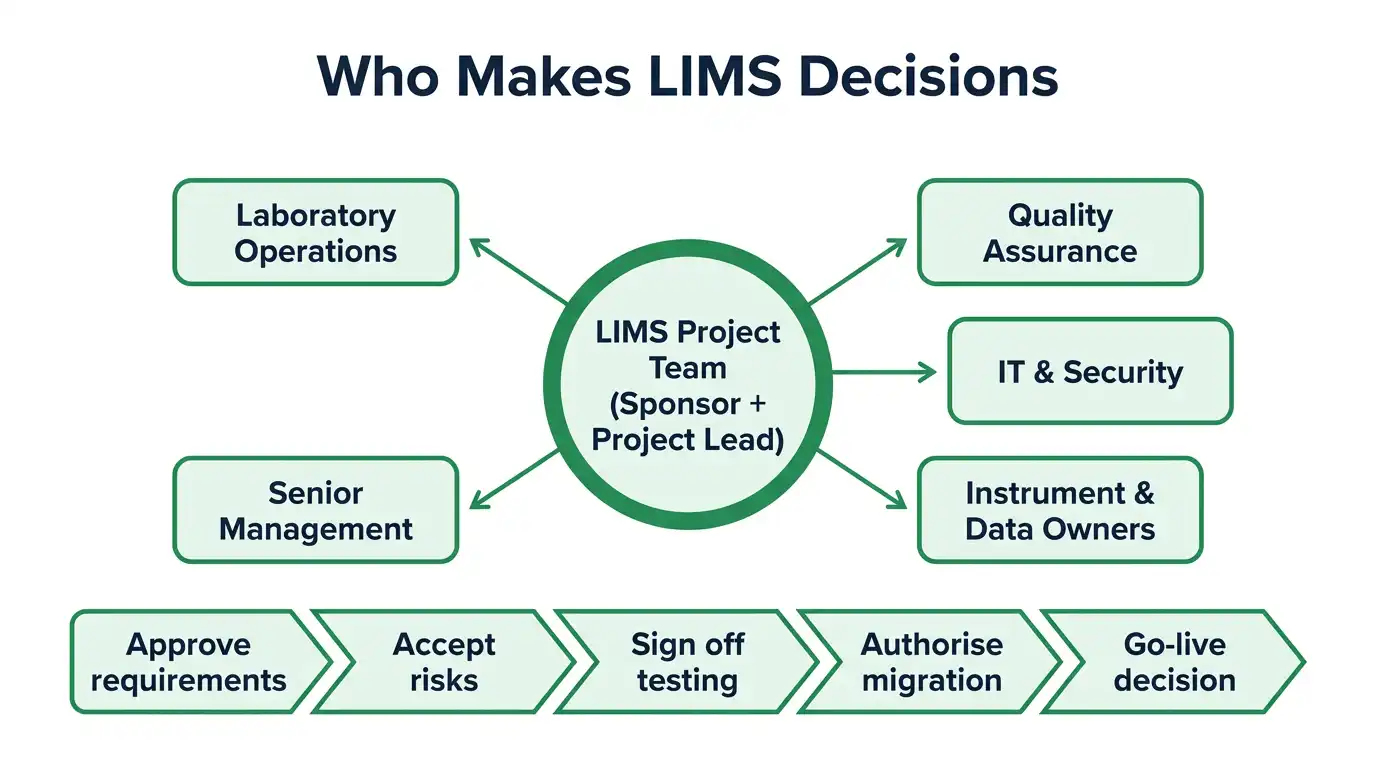
The project needs a sponsor and a day-to-day project lead, plus representatives from laboratory operations, QA, IT, information security and relevant business functions. Bring in instrument owners, data owners, records-management specialists and procurement or facilities teams where their decisions affect the design. Assign decision rights: who approves requirements, accepts risks, signs off testing, authorises migration and makes the go-live decision?
3. Clear and prioritised requirements
Write requirements as observable outcomes. "The system must be user-friendly" is hard to test. "An authorised analyst can register a sample, assign a unique identifier and view its status" is far more actionable. Classify requirements as critical, important or optional, and link each critical requirement to a test or other objective evidence.
| Requirement area | Questions to resolve |
|---|---|
| Workflow | Which sample stages, statuses, queues, holds and approvals are required? |
| Results and methods | How are methods, units, limits, calculations, rounding and out-of-specification events controlled? |
| Traceability | What identifiers, timestamps, custody events and audit information must be retained? |
| Reporting | Which report formats, recipients, review steps and release controls are needed? |
| Interfaces | Which instruments and business systems exchange data, in what format and direction? |
| Security | How are identities, roles, authentication, segregation of duties and access reviews managed? |
| Records | What retention, retrieval, backup, restoration and archival requirements apply? |
4. Data governance and migration planning
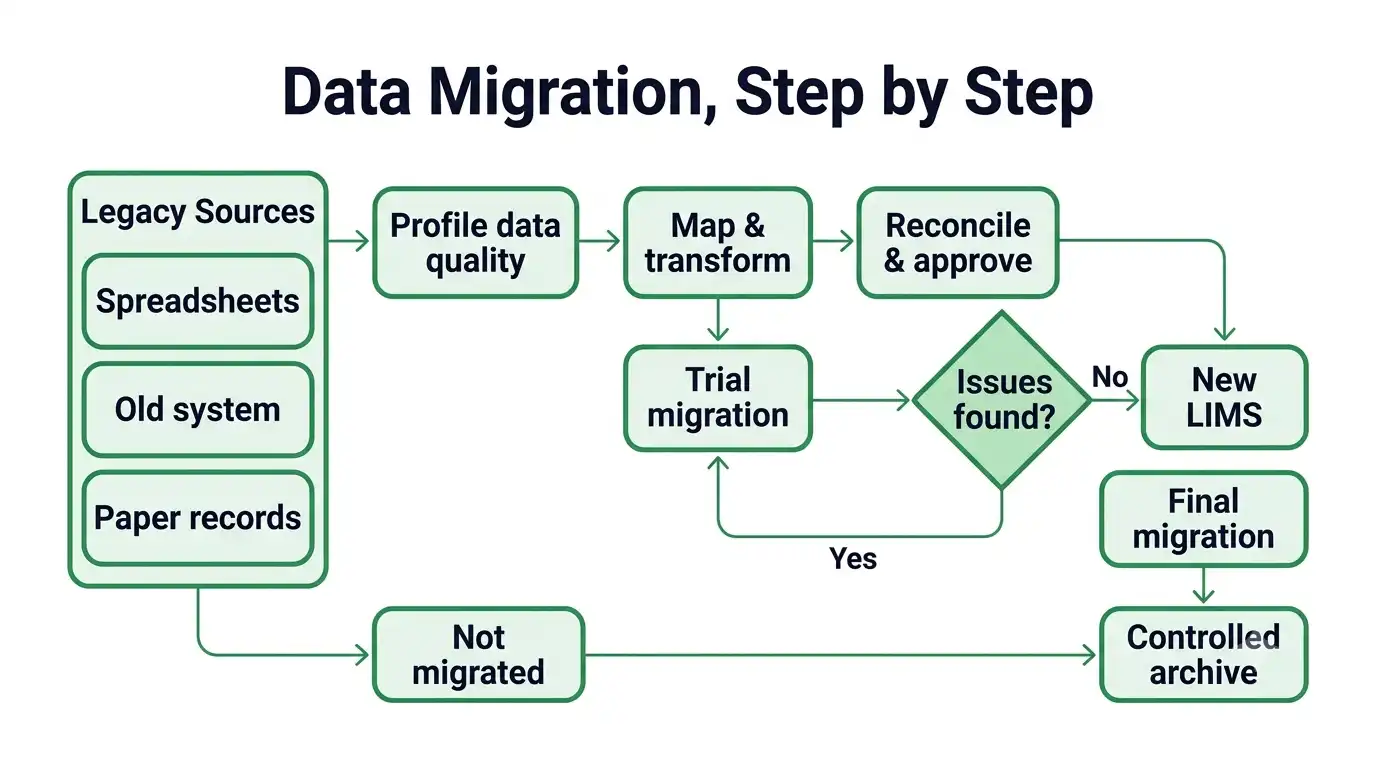
Identify the data that must be migrated and the data that should stay in a controlled archive. Typical data includes sample histories, customer or product records, methods, specifications, test definitions, equipment details and open work. Profile data quality before migration. Check for duplicates, missing fields, inconsistent units, invalid codes and relationships that no longer make sense. Define mapping rules, transformation approvals, trial migrations, reconciliation totals and exception handling. Keep source records and document the migration so the laboratory can explain what was moved, how and when.
5. Integration and technical readiness
Create an interface inventory covering analytical instruments, balances, chromatography data systems, enterprise resource planning, quality management, customer portals, identity services and reporting tools, as applicable. For each connection, specify ownership, data fields, units, direction, frequency, error handling, security and support. Test both successful and unsuccessful transfers. A connection that sends data is not necessarily a reliable interface. Laboratories must verify identity matching, completeness, precision, duplicate prevention and recovery after interruption.
6. Quality, security and compliance controls
Assess which regulatory and accreditation requirements apply to the laboratory and to the records it creates. For example, ISO/IEC 17025:2017 addresses competence, impartiality and consistent operation of testing and calibration laboratories [1]. In US FDA -regulated contexts, 21 CFR Part 11 may apply to electronic records and electronic signatures when the conditions in its scope are met. It should not be treated as a blanket requirement for every LIMS [2][3]. MHRA guidance describes data-integrity expectations, including ALCOA principles and the importance of complete, consistent, enduring and available data [4].
Controls may include unique user accounts, role-based access, secure authentication, audit trails, controlled configuration, electronic-signature controls where applicable, record retention, backup and tested restoration. Document the reason for each control and have QA, regulatory and IT specialists review the interpretation. Check standards and regulations in their current official versions before the project is approved.
How Does a Structured Workflow Support LIMS Implementation?
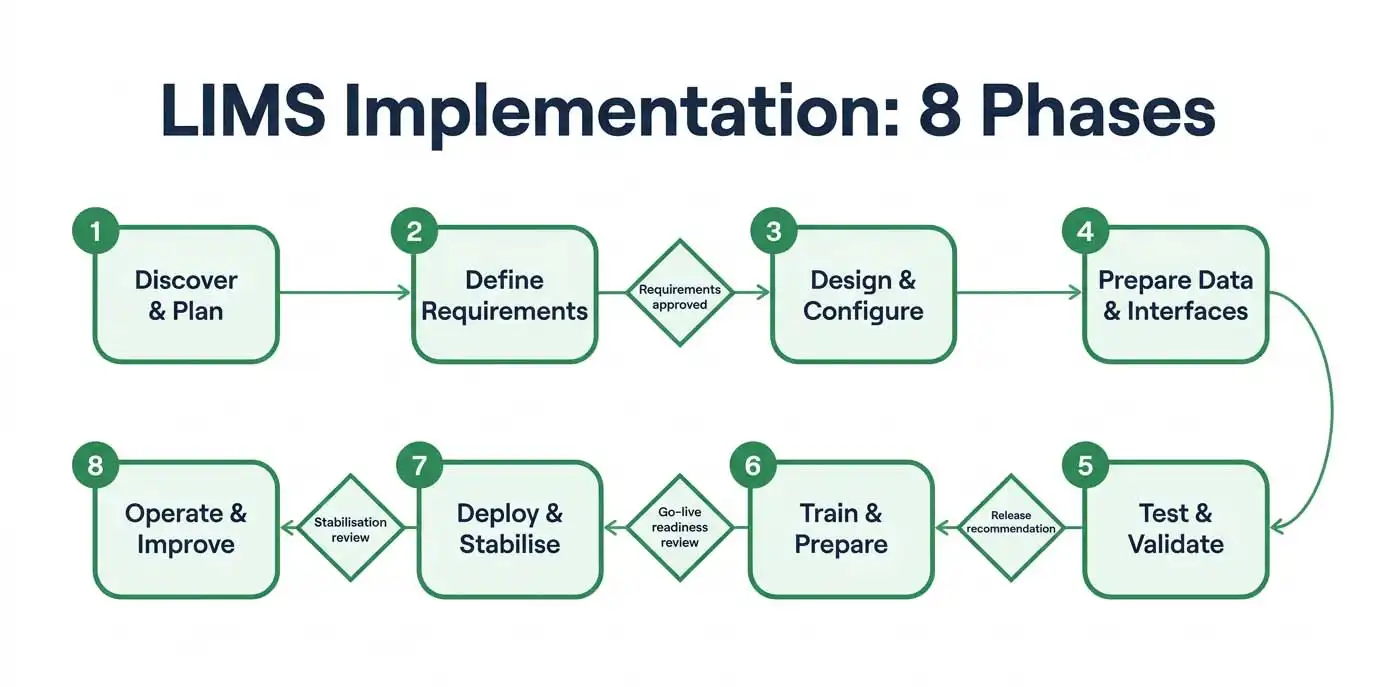 A phased workflow turns a broad technology change into manageable decisions and evidence-based checkpoints. Each phase should produce defined outputs that the next phase can use. The sequence below is a practical model. Some activities may overlap, and regulated laboratories may need additional formal reviews or approvals based on their quality system and intended use.
| Phase | Core activities | Typical deliverables / exit check |
|---|---|---|
| 1. Discover and plan | Assess processes, risks, scope, stakeholders, resources and success measures. | Approved charter, scope, current-state maps, risk register and project plan. |
| 2. Define requirements | Prioritise functional, technical, quality, security and reporting needs. | Approved requirements, traceability approach and acceptance criteria. |
| 3. Design and configure | Design workflows, roles, forms, master data, calculations and reports. | Configuration/design specifications and reviewed prototypes. |
| 4. Prepare data and interfaces | Clean data, map fields, build interfaces and plan migration. | Data mapping, migration plan, interface specifications and test data. |
| 5. Test and verify/validate | Execute risk-based tests, resolve defects and assess intended-use suitability. | Approved test evidence, defect records, traceability and release recommendation. |
| 6. Train and prepare | Train role groups, update SOPs, rehearse cutover and confirm support. | Training records, revised procedures, cutover checklist and contingency plan. |
| 7. Deploy and stabilise | Migrate approved data, switch operations, monitor issues and support users. | Go-live approval, reconciliation, issue log and stabilisation review. |
| 8. Operate and improve | Review performance, access, changes, incidents, backups and user feedback. | Periodic review records, improvement backlog and controlled changes. |
Want a week-by-week view? See our LIMS implementation guide and 12-week roadmap.
What should testing and validation cover?
Testing should show that critical workflows and controls perform as specified in the intended operating environment. Depending on risk and scope, test scenarios may cover:
- Sample registration, unique identification, relabelling rules and end-to-end traceability.
- Correct method, specification, unit, calculation, rounding and result status handling.
- Review, approval, release, amended results and controlled report generation.
- Role permissions, failed logins, account changes, audit-trail entries and electronic signatures where used.
- Instrument data transfer, invalid messages, duplicate records, network interruption and recovery.
- Migration completeness, relationship integrity, record readability and reconciliation.
- Backup, restoration, disaster recovery and availability of retained records.
Use a documented risk-based approach. Identify intended use, critical functions, potential failure modes and the evidence needed to build confidence. WHO Technical Report Series No. 1052 (2024), Annex 4, discusses information-system validation planning, LIMS procedures, access rules, backup and restoration in pharmaceutical quality-control laboratories [5]. FDA guidance on computer software assurance is specific to its stated medical-device production and quality-system context. Apply it only where relevant, not as a universal LIMS rule [6].
How should laboratories manage go-live?
Base the go-live decision on readiness evidence, not a target date alone. Confirm that critical defects are closed or formally assessed, users are trained, master data is approved, interfaces are monitored, support coverage is available and rollback or contingency arrangements are understood. Rehearse the cutover sequence, including data freeze, final migration, reconciliation, user access activation and communication. After launch, use a defined stabilisation period with daily issue review and clear escalation routes.
How Can a Laboratory Get Started?
Start with a short discovery exercise before committing to detailed configuration or a deployment date. Bring together the people who understand the work, the quality obligations and the technical environment. The first objective is to agree what the laboratory needs the system to do, what evidence will show readiness and who is accountable for each decision.
- Appoint a sponsor and project lead. Confirm who can approve scope, budget, risks and go-live.
- Map one representative sample journey from receipt through testing, review, reporting and retention.
- Document pain points and find the root causes rather than automating every existing workaround.
- Create a prioritised requirements list and connect critical requirements to acceptance tests.
- Inventory systems, instruments, data sources, interfaces and records that may be affected.
- Review applicable standards, regulations, accreditation requirements and internal procedures with QA and regulatory specialists.
- Estimate project capacity, including user participation, data cleanup, testing, training and post-launch support.
- Agree measurable success criteria and baseline current performance.
- Plan a pilot or phased rollout where it reduces risk without creating uncontrolled parallel processes.
- Schedule a formal readiness review before production use and a post-implementation review after stabilisation.
A practical first deliverable is a concise implementation brief: problem statement, scope, stakeholders, high-level workflow, risks, dependencies, success measures and decisions still required.
FAQs
How long does LIMS implementation take?
There is no universal timeline. Duration depends on the number of laboratories and workflows, configuration complexity, data quality, integrations, validation expectations, procurement and staff availability. A focused project with limited interfaces may be simpler than a multi-site deployment with extensive legacy migration. Build the schedule from deliverables and dependencies, then allow time for user review, testing, training and stabilisation.
Does every LIMS need validation?
It depends on intended use, the laboratory's regulatory and quality obligations, and the risks of the system. Some environments require formal validation. Others may use verification, assurance or documented testing proportionate to risk. Document your rationale and get QA or regulatory review. Do not assume that all systems need the same package, or that commercial software needs no assessment.
What is the difference between LIMS configuration and customisation?
Configuration uses supported settings, such as workflows, roles, forms and rules, to adapt the system. Customisation changes or extends software behaviour, often through code or bespoke components. It may add flexibility, but it can also add complexity to testing, upgrades, support and maintenance. Check whether a process change or standard configuration can meet the requirement before approving custom development.
What data should be migrated?
Migrate only data that has a defined operational, legal, quality or business need in the new system. This may include active samples, approved methods, specifications, master data and selected historical records. Keep other records in a controlled archive where that is appropriate and permitted. Define retention requirements, source-of-truth rules, mapping, reconciliation and access before migration begins.
How can laboratories reduce user resistance?
Involve representative users early, explain why workflows are changing, demonstrate prototypes, invite feedback and provide role-specific training. Make procedures and quick-reference material available at the point of work. Identify super-users or local champions, provide accessible support during go-live and act visibly on recurring issues. User adoption is an operational responsibility, not only a training task.
Should a laboratory deploy everything at once?
Not necessarily. A phased rollout or pilot can reduce risk when workflows, sites or integrations vary. However, phased deployment needs clear boundaries, consistent master data and controlled handling of work that crosses old and new processes. Choose the rollout model based on operational dependencies, risk, support capacity and the ability to reconcile records across phases.
What should be monitored after deployment?
Monitor system availability, interface failures, unresolved incidents, sample turnaround time, rework, result amendments, overdue reviews, user adoption, access changes and backup or restoration outcomes. Compare performance with the baseline and review whether the system still meets its intended use. Changes should follow documented impact assessment, testing, approval and release controls.
Can a LIMS replace every spreadsheet and laboratory application?
No. Some spreadsheets or specialist applications may remain appropriate for defined purposes, but their use should be assessed and governed. Identify which records are authoritative, how information moves between systems, who owns each data set and how version control, access, review and retention are handled. Avoid creating duplicate sources of truth.
Conclusion
LIMS implementation succeeds when laboratory processes, people, data, technology and quality controls are treated as connected parts of one change. Clear requirements and governance provide direction. Thoughtful configuration, migration and integration create operational fit. Risk-based testing, training and readiness reviews build confidence before go-live. Post-deployment ownership then keeps the system reliable as methods, teams and requirements evolve.
The most useful starting point is not a feature list or a deployment date. It is a shared understanding of the laboratory's current work, the outcomes it needs and the evidence required to show that the new environment is fit for purpose.
Planning a LIMS project?
Bring laboratory operations, QA and IT together to map one end-to-end sample workflow, identify the records and controls it depends on, and agree the first set of measurable requirements. A focused discovery workshop can help turn broad expectations into a realistic implementation plan.
Author: Revol Team · marketing@revollims.com · www.revollims.com