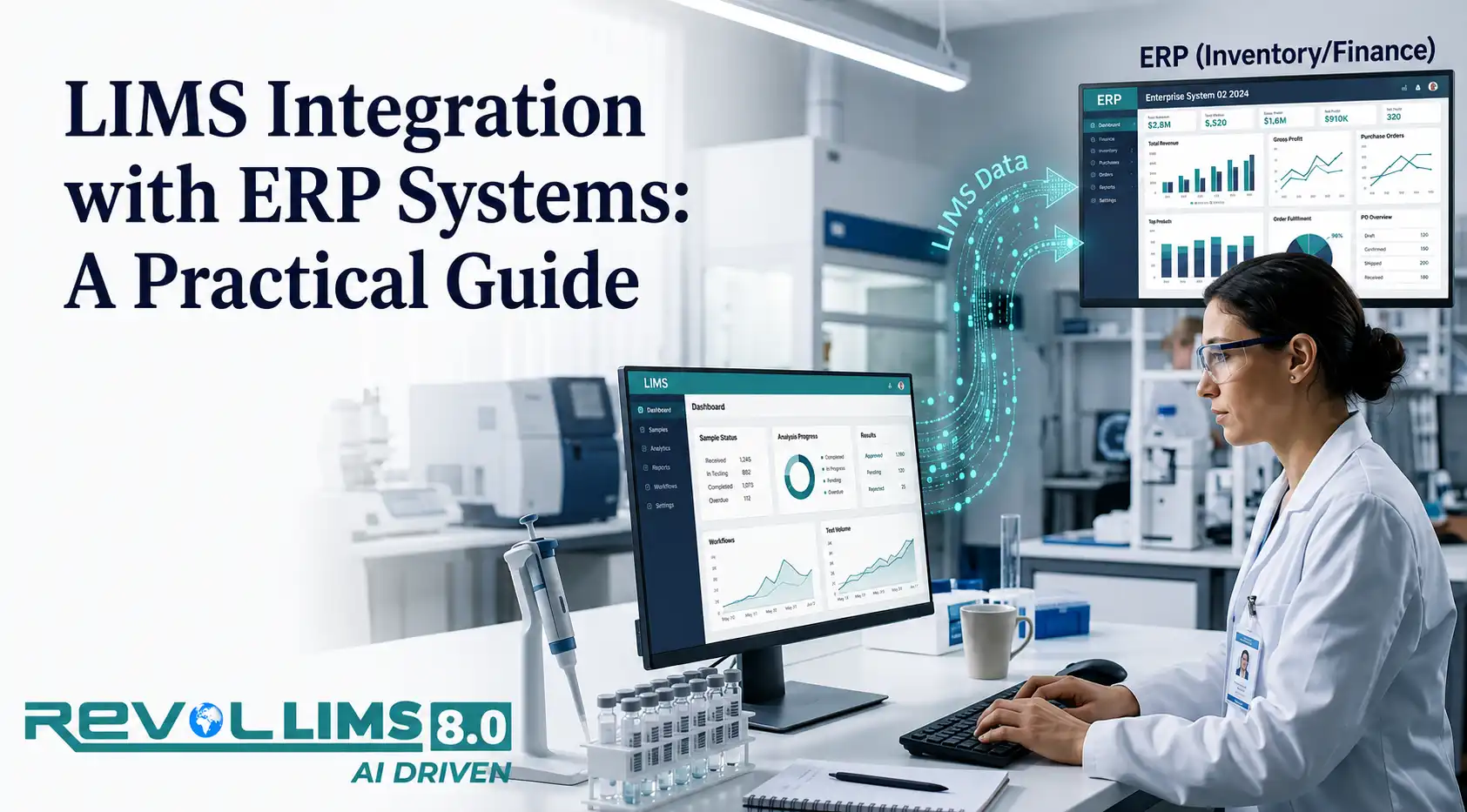
If you work in a lab that sits inside a manufacturing operation, you already know the two systems that run your day: the LIMS, which manages samples, tests, and results, and the ERP, which manages materials, production orders, and inventory. On paper, they cover different jobs. In practice, they depend on each other constantly.
A raw material can't move into production until it passes QC. A finished batch can't ship until the certificate of analysis is signed off. A production order can't close until the lab confirms the numbers. When LIMS and ERP don't talk to each other directly, someone in the middle has to do it for them — usually by re-typing data, emailing spreadsheets, or chasing approvals across departments.
This guide walks through what LIMS-ERP integration actually involves, the data that typically moves between the two systems, the common ways to connect them, and a step-by-step approach you can use to plan your own integration project. It's written for lab managers, QA/QC teams, and IT teams who need a clear, practical starting point — not a sales pitch.
What Does LIMS Integration with ERP Systems Actually Mean?
LIMS integration with ERP systems means setting up a reliable, mostly automatic exchange of data between your laboratory information management system and your enterprise resource planning system, so that information created in one system is available in the other without manual re-entry.
This isn't about merging the two systems into one. LIMS stays focused on sample management, test execution, specifications, and results. ERP stays focused on materials, purchasing, production scheduling, inventory, and finance. Integration simply builds a bridge so the right piece of information reaches the right system at the right time.
A simple way to think about it:
- LIMS answers the question: “Is this material or batch good?”
- ERP answers the question: “What do we do with it next — use it, ship it, hold it, or reject it?”
Without integration, a person has to carry the answer from one system to the other. With integration, the systems carry it themselves.
Why Labs and Manufacturers Integrate LIMS and ERP Systems
Most companies don't start an integration project because it sounds interesting. They start because manual handoffs are slowing down operations or creating risk. Some common triggers:
- Materials sit in a quarantine or holding status longer than necessary because someone has to manually update the ERP status after LIMS approval.
- QA spends time re-entering the same result values into a quality module or spreadsheet that already exist in the LIMS.
- Production schedulers don't have visibility into pending lab results, so they can't plan the next step with confidence.
- Audits turn up mismatches between what the LIMS shows and what the ERP shows for the same batch.
- Growing sample volumes make manual data transfer between systems a genuine bottleneck rather than a minor inconvenience.
None of these problems is dramatic on its own. But added together over months, they create delays, rework, and a nagging sense that the two systems don't fully trust each other's data. Integration addresses this by making the data flow automatic, consistent, and traceable.
What Changes Once LIMS and ERP Are Connected
It helps to be specific about what actually improves once the two systems are integrated, rather than talking about it in abstract terms. In practical terms, teams typically notice:
- Faster movement of materials and batches through quality gates, because status updates happen automatically instead of waiting for someone to log in and update a second system
- Fewer transcription errors, since values entered once in LIMS don't need to be manually copied into ERP (and vice versa)
- Better visibility for production planners, who can see pending vs. completed QC status directly in the scheduling tools they already use
- Cleaner audit trails, because the same batch or sample ID is used consistently across both systems instead of being re-keyed and potentially mistyped
- Less time spent by QA staff on administrative data entry, freeing them up for actual review and investigation work
None of this happens automatically just because two systems are technically connected — it depends on the integration being designed around the real process, which is why the planning steps later in this guide matter as much as the technical build itself.
What Data Typically Flows Between LIMS and ERP
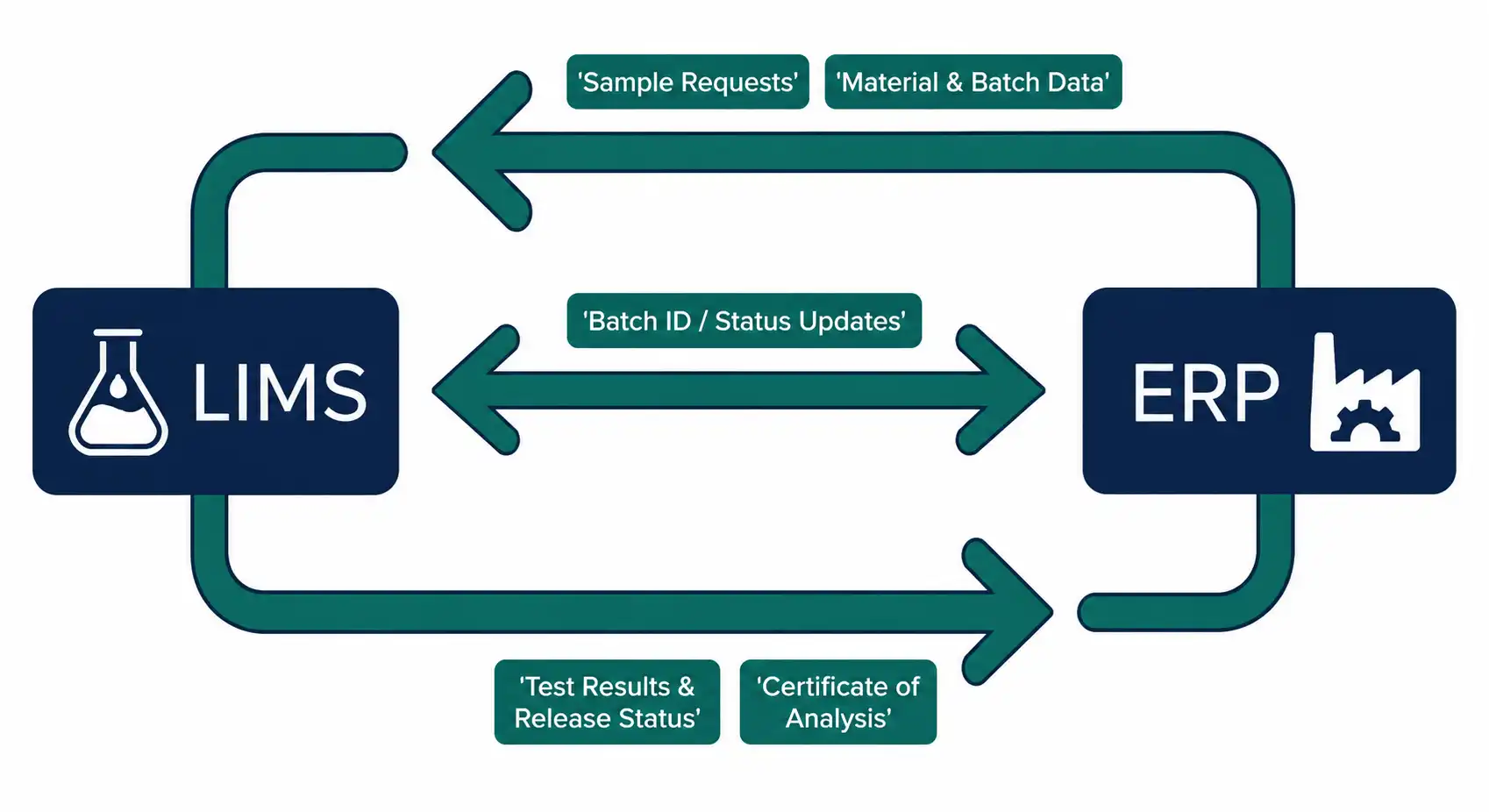
The exact data exchanged depends on the industry and the specific workflows in place, but most LIMS-ERP integrations cover a similar core set of information. Here's a practical breakdown:
| Direction | Typical Data | Example Use Case |
|---|---|---|
| ERP → LIMS | Material or batch master data, purchase order details, sample requests, work order numbers | A raw material lot is received in ERP, which triggers a sample request in LIMS for incoming QC testing. |
| LIMS → ERP | Test results, pass/fail status, certificate of analysis data, batch release or hold status | QC completes testing on a finished batch; LIMS sends the release decision to ERP so the batch can be shipped. |
| LIMS → ERP | Specification limits and stability data, where relevant | Stability results confirm shelf life, which updates expiry information tied to inventory in ERP. |
| ERP → LIMS | Customer or product specifications linked to an order | A customer order requires specific test parameters, which LIMS uses to build the correct test plan. |
| Bi-directional | Sample and batch identifiers, status updates, document references | Both systems reference the same batch ID so records can be cross-checked during an audit. |
Not every organization needs to integrate all of this. Many companies start with the highest-impact flow — usually sample requests going from ERP to LIMS, and release status going from LIMS back to ERP — and expand from there once the initial connection is proven reliable.
Common Integration Approaches
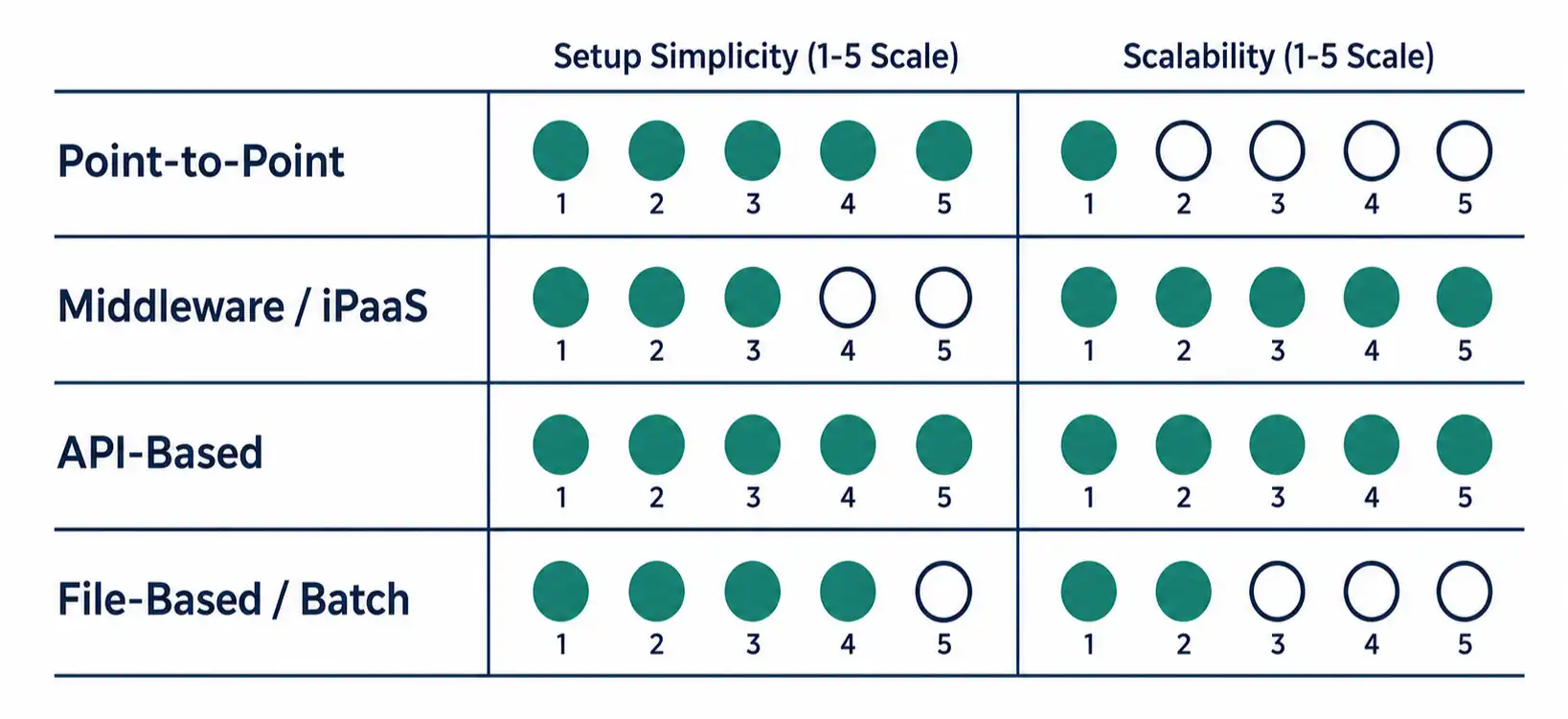
There isn't one single way to connect a LIMS and an ERP system. The right approach depends on your existing IT infrastructure, budget, technical resources, and how much automation you actually need. Here are the main options.
1. Point-to-Point (Custom) Integration
This is a direct connection built specifically between your LIMS and your ERP, usually developed by an internal IT team or an integration partner. It works well when you have one LIMS and one ERP and don't expect to add more systems to the mix.
- Pros: Tailored exactly to your workflows; no extra licensing for middleware.
- Cons: Can become harder to maintain as requirements change; every future system you add may need its own custom connection.
2. Middleware or Integration Platform (iPaaS)
Middleware sits between the LIMS and ERP (and often other systems too, like MES or a document management system) and manages the data flow centrally. Instead of building direct connections between every pair of systems, each system connects once to the middleware layer.
- Pros: Easier to scale as you add more systems; centralized monitoring and error logging; changes to one system don't always require rebuilding the whole integration.
- Cons: Adds another platform to license, configure, and maintain.
3. API-Based Integration
Most modern LIMS and ERP platforms expose APIs (application programming interfaces) that allow systems to request and send data in a structured, real-time or near-real-time way. API-based integration is generally the preferred method today because it's more reliable and easier to troubleshoot than older file-based methods.
- Pros: Real-time or near-real-time data exchange; structured error handling; easier to monitor.
- Cons: Requires that both systems have well-documented, stable APIs, and some technical setup on both sides.
4. File-Based or Batch Integration
In this approach, one system exports data (often as a CSV or XML file) on a schedule, and the other system imports it. This is an older method but still common, especially with legacy ERP systems that don't offer modern APIs.
- Pros: Simple to set up; works even with older systems.
- Cons: Not real-time — there's always a delay; more prone to file-format errors and missed transfers.
A Practical Step-by-Step Guide to LIMS-ERP Integration
Whether you're planning a small integration project or a larger one across multiple sites, the same general sequence applies. Skipping steps — especially process mapping — is the most common reason integration projects run over budget or fail to deliver the expected value.
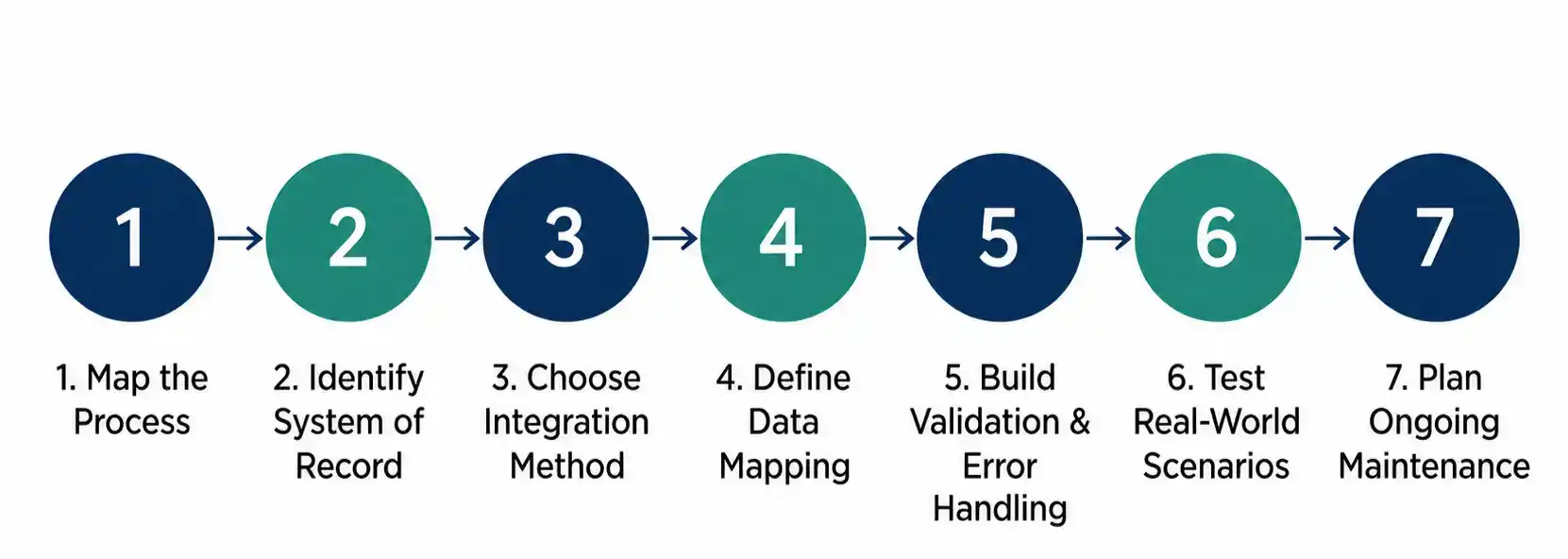
Step 1: Map the Business Process Before You Map the Data
Before any technical discussion, sit down with the people who actually do the work — QC analysts, production schedulers, warehouse staff — and walk through the process as it happens today. For example: what exactly happens between a raw material arriving at the dock and it being released for production use? Who creates the sample request? Who updates ERP once the result is in? Where do delays or errors currently happen?
This step often reveals that the “real” process is different from the documented SOP, which is valuable information before you automate anything.
Step 2: Identify the System of Record for Each Data Type
For every piece of data that will flow between systems, decide which system “owns” it. Test results should be owned by LIMS. Inventory quantities should be owned by ERP. Having a clear system of record avoids situations where the same field can be edited in two places and conflict with itself.
Step 3: Choose the Integration Method
Based on your existing systems, technical resources, and how many systems you'll eventually need to connect, decide between point-to-point, middleware, API-based, or file-based integration (or a combination). If you already have other systems that would benefit from centralized integration — like an MES or a document management system — middleware is usually worth the extra investment.
Step 4: Define the Data Mapping
This is where you get specific: which field in LIMS corresponds to which field in ERP, what format each field needs to be in, and how status codes should translate between systems. For example, LIMS might use “Pass,” “Fail,” and “Pending” for a result status, while ERP might use numeric status codes for inventory. This mapping needs to be documented clearly and agreed on by both the lab and IT teams.
Step 5: Build in Validation and Error Handling
Integrations fail sometimes — a field doesn't map correctly, a connection times out, a required value is missing. What matters is what happens next. Good integration design includes:
- Clear error messages that tell someone exactly what failed and why
- A way to flag and hold a record that fails validation, rather than letting bad data pass through silently
- Logging so IT and QA can trace exactly what happened to a specific sample or batch record
- A defined person or team responsible for reviewing and resolving integration errors
Step 6: Test With Real-World Scenarios, Not Just Ideal Ones
It's easy to test an integration with a clean, simple sample record and see it work perfectly. The real test is what happens with edge cases: a sample that gets retested, a batch that's partially rejected, a material that gets renamed mid-process, or a result that arrives out of sequence. Testing these scenarios before go-live prevents surprises during actual production use.
Step 7: Plan for Ongoing Maintenance
An integration isn't a one-time project that's finished at go-live. LIMS and ERP systems both get updated over time, and those updates can change field names, APIs, or data structures. Assign ownership — someone in IT and someone in QA or lab operations — who is responsible for monitoring the integration and updating it when either system changes.
Common Challenges in LIMS-ERP Integration (and How to Handle Them)
Inconsistent Data Formats
LIMS and ERP systems often store the same type of information differently — different date formats, different unit conventions, different ways of representing a batch number. Address this early in the data mapping step, not after the integration is live.
Unclear Ownership of Master Data
If both systems allow editing of the same master data (like material names or specifications), conflicts happen. Set one system as the source of truth for each data type, and make the other system read-only for that data.
Legacy Systems Without Modern APIs
Older ERP systems, in particular, sometimes lack robust APIs. In these cases, file-based integration or a middleware layer with a legacy connector may be the only practical route, at least until the ERP itself is upgraded.
Change Management Resistance
Analysts and schedulers who are used to manual processes may be hesitant to trust an automated system, especially right after go-live. Involve them early in process mapping and testing so they understand how the integration works and what to do if something looks wrong.
Underestimating Validation Requirements
In regulated environments, any system that affects product release decisions typically needs to be validated, and that includes the integration itself, not just the two systems individually. Build validation time and documentation into the project timeline from the start.
Timing and Sequencing Issues
Sometimes data arrives at the wrong point in a workflow — for example, an ERP goods-receipt transaction fires before the LIMS sample request has been fully created, or a result is sent to ERP before all required approvals are complete in LIMS. These timing issues are usually not obvious until you test with realistic, slightly messy scenarios rather than a clean demo dataset.
Scope Creep During the Project
It's common for a project that starts as “just send release status to ERP” to slowly expand to include a dozen other data points once people realize what's possible. This isn't necessarily bad, but it can stall a project indefinitely if scope isn't managed. A phased approach — get the highest-priority flow working and validated first, then add more — tends to deliver value faster than trying to integrate everything at once.
Industry-Specific Considerations
Pharmaceutical and Life Sciences
For pharmaceutical manufacturers, the integration often needs to support batch release workflows where LIMS results directly determine whether ERP allows a batch to move to the next stage or ship. Traceability between the two systems — being able to show exactly which result led to which ERP status change — is usually a core requirement, along with proper validation documentation for the integration itself.
Chemical Manufacturing
Chemical companies frequently deal with raw material variability, so incoming QC testing tied to ERP receipt transactions is a common integration priority. Specification management — making sure the correct test limits are pulled based on the material and supplier — is often a key part of the data flow from ERP to LIMS.
Food and Beverage Laboratories
Food labs often need fast turnaround on microbiological and chemical testing before products can be released for shipment. Integration here focuses on speed: getting release status from LIMS to ERP quickly enough that it doesn't become the bottleneck in an already time-sensitive supply chain.
General Manufacturing
For manufacturers with an in-house QC lab supporting production, the priority is usually tying lab results to specific work orders or production batches in ERP, so schedulers have real-time visibility into what's cleared for the next process step and what's still pending.
Best Practices Checklist
A short list to refer back to when planning or reviewing a LIMS-ERP integration project:
- Start with the highest-impact data flow, not the most complete one
- Involve lab, QA, and IT teams in planning — not just IT
- Document data ownership for every field that will be exchanged
- Choose an integration method that matches your current systems and your future plans, not just what's easiest right now
- Build error handling and alerts into the design, not as an afterthought
- Test with real, messy, real-world scenarios before go-live
- Assign clear ongoing ownership for monitoring and maintaining the integration
- Keep documentation current as either system is updated
Off-the-Shelf Connectors vs. Custom Integration
Some LIMS and ERP vendors offer pre-built connectors for common ERP platforms. These can significantly reduce setup time if your specific combination of systems and workflows is a close match to what the connector supports. But pre-built connectors aren't always a perfect fit — they're built for common scenarios, and your lab's specific workflow may need adjustments.
Before choosing between a pre-built connector and a custom-built integration, it helps to ask:
- Does the connector support the specific data flows our process requires, or only a subset?
- How much configuration flexibility does it offer for our specific status codes, units, and field mappings?
- Who supports the connector if something breaks — the LIMS vendor, the ERP vendor, or a third party?
- What happens if we upgrade either system — does the connector get updated automatically, or does it require separate maintenance?
There's no universally right answer here. A pre-built connector can save time for straightforward workflows, while a custom or middleware-based approach gives more control for organizations with unique or complex processes.
How to Tell the Integration Is Working Well
Once an integration is live, it's worth checking in periodically — not just at go-live, but a few months in, once the initial excitement has worn off and the system is handling real day-to-day volume. A few practical signals to look at:
- Are QA and production staff actually using the automated status updates, or have they quietly gone back to checking or updating things manually because they don't fully trust the integration yet?
- How often does the error queue (if you have one) get flagged, and are those errors being resolved quickly or piling up?
- When a discrepancy is found between LIMS and ERP data, how long does it take to trace the cause? A well-designed integration should make this fairly quick, since both systems reference the same identifiers and the data flow is logged.
- Has the time spent on manual data entry for the integrated workflow actually gone down, or has a new manual step crept in somewhere else to work around a gap in the integration?
These check-ins are also a good opportunity to revisit scope. It's common for the first phase of an integration to reveal a second, smaller data flow that would be worth automating next — something that wasn't obvious until the team saw the first phase working.
Frequently Asked Questions
How long does a typical LIMS-ERP integration project take?
This depends heavily on scope, the systems involved, and whether validation is required. A narrow, single-workflow integration (like sending release status from LIMS to ERP) is generally faster to implement than a broad integration covering many data flows across multiple sites. Rather than estimating a fixed timeframe, it's more useful to scope the project in phases and set realistic milestones for each one.
Do we need middleware, or can we integrate directly?
If you only have one LIMS and one ERP and don't expect to add more connected systems, direct (point-to-point) integration can work fine. Middleware becomes more valuable once you're connecting three or more systems, since it centralizes monitoring and reduces the number of custom connections you need to maintain.
Can LIMS and ERP integration help with regulatory compliance?
Integration can support compliance efforts by improving data consistency and traceability between systems, and by reducing manual transcription errors. That said, integration on its own doesn't guarantee compliance — the underlying process, documentation, and validation still need to meet the relevant requirements for your industry and region.
What's the biggest mistake companies make with LIMS-ERP integration?
Starting with the technical build before fully mapping the business process. Teams that jump straight into configuring an API connection often discover partway through that they hadn't agreed on data ownership, status code mapping, or exception handling — which means rework later. Spending more time upfront on process mapping tends to save time overall.
Does every lab need LIMS-ERP integration?
Not necessarily. A small lab with low sample volume and infrequent handoffs to production or shipping may find that manual coordination is manageable. Integration tends to deliver the most value as sample volume, site count, or the frequency of quality-gated handoffs increases — that's usually when manual processes start to become a genuine bottleneck rather than a minor inconvenience.
Final Thoughts
LIMS integration with ERP systems isn't about adding complexity for its own sake — it's about removing the manual steps that slow labs and production teams down and introduce room for error. The organizations that get the most value from integration are usually the ones that start with a clear picture of their actual process, agree on data ownership before writing any code, and treat the integration as something that needs ongoing attention, not a project that ends at go-live.
If you're evaluating LIMS and ERP software for your lab, or planning to connect systems you already have, starting with the process mapping and data ownership steps outlined here will put you in a much stronger position than jumping straight to a technical solution.
Author: Revol LIMS Team





 (1) (1).webp)