How Does a LIMS Integrate with Other Lab Systems? A Practical Guide for Lab Teams
Short answer: A LIMS integrates with other lab systems by exchanging data through defined interfaces: instrument connections, APIs, standard messaging formats such as HL7, and file-based transfers. The LIMS usually acts as the system of record for samples, tests, and results, while connected systems supply orders, raw data, inventory, or quality records.
Most laboratories do not run on one system. They run on many.
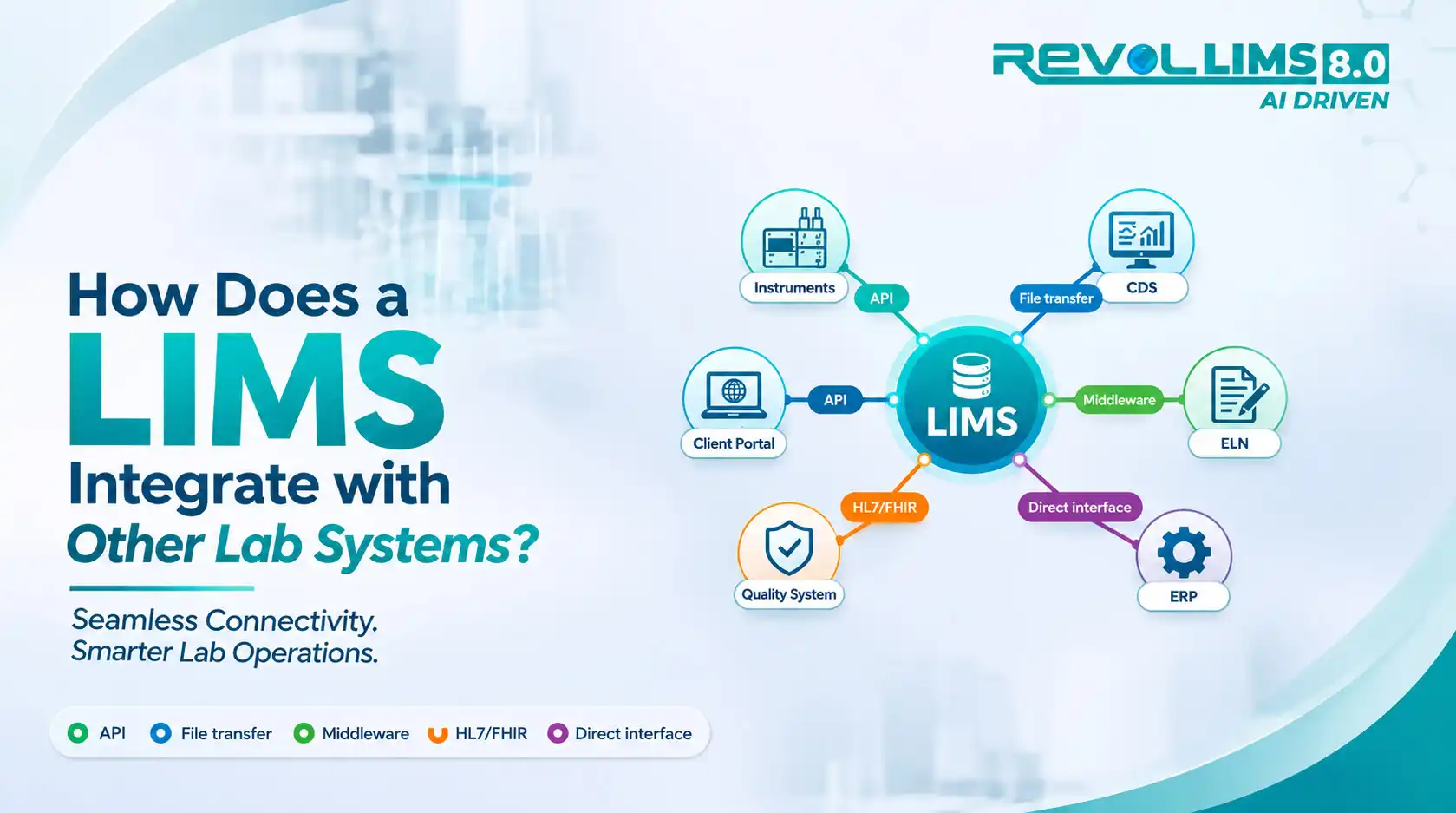
A typical lab may use a LIMS, an electronic lab notebook (ELN), a chromatography data system (CDS), instrument software, an ERP platform, a document control tool, and a quality management system. Each does its job well. The trouble starts when they cannot share information cleanly.
When systems stay disconnected, people fill the gaps. They retype results, export spreadsheets, and match records by hand. Every manual step adds time. It also adds risk to data integrity.
This guide explains how LIMS integration works in plain terms. It covers what gets connected, how the connections are built, where labs struggle, and how to plan a realistic first project.
It is written for lab directors, QA/QC managers, IT teams, and decision-makers. It is vendor-neutral and focused on concepts, standards, and practical steps.
Key Takeaways
- Integration is about data flow, not just software links. The goal is accurate, traceable information moving between systems with little manual handling.
- A LIMS usually sits at the center. It manages samples, tests, results, and release. Other systems feed it or consume its output.
- There is more than one way to connect systems. Common options include direct instrument interfaces, middleware, APIs, file transfers, and standard messages.
- Standards reduce custom work. Formats and protocols such as HL7, FHIR, SiLA 2, and AnIML help systems understand each other.
- Regulations care about interfaces. ISO/IEC 17025 expects laboratory information systems, including their interfaces, to be validated and protected.
- Start small. A single high-value interface, such as an instrument that produces many results, is a better first step than a large all-at-once project.
- Governance matters as much as technology. Clear data ownership, naming rules, and change control keep integrations reliable over time.
What Does LIMS Integration Actually Mean?
Short answer: LIMS integration means connecting a laboratory information management system to other software and equipment so data moves between them automatically, accurately, and with a record of what happened. It replaces manual copying with controlled exchanges, keeping samples, results, and quality records consistent across the lab's systems.
Integration is often described as "connecting systems." That is true, but it is too vague to be useful.
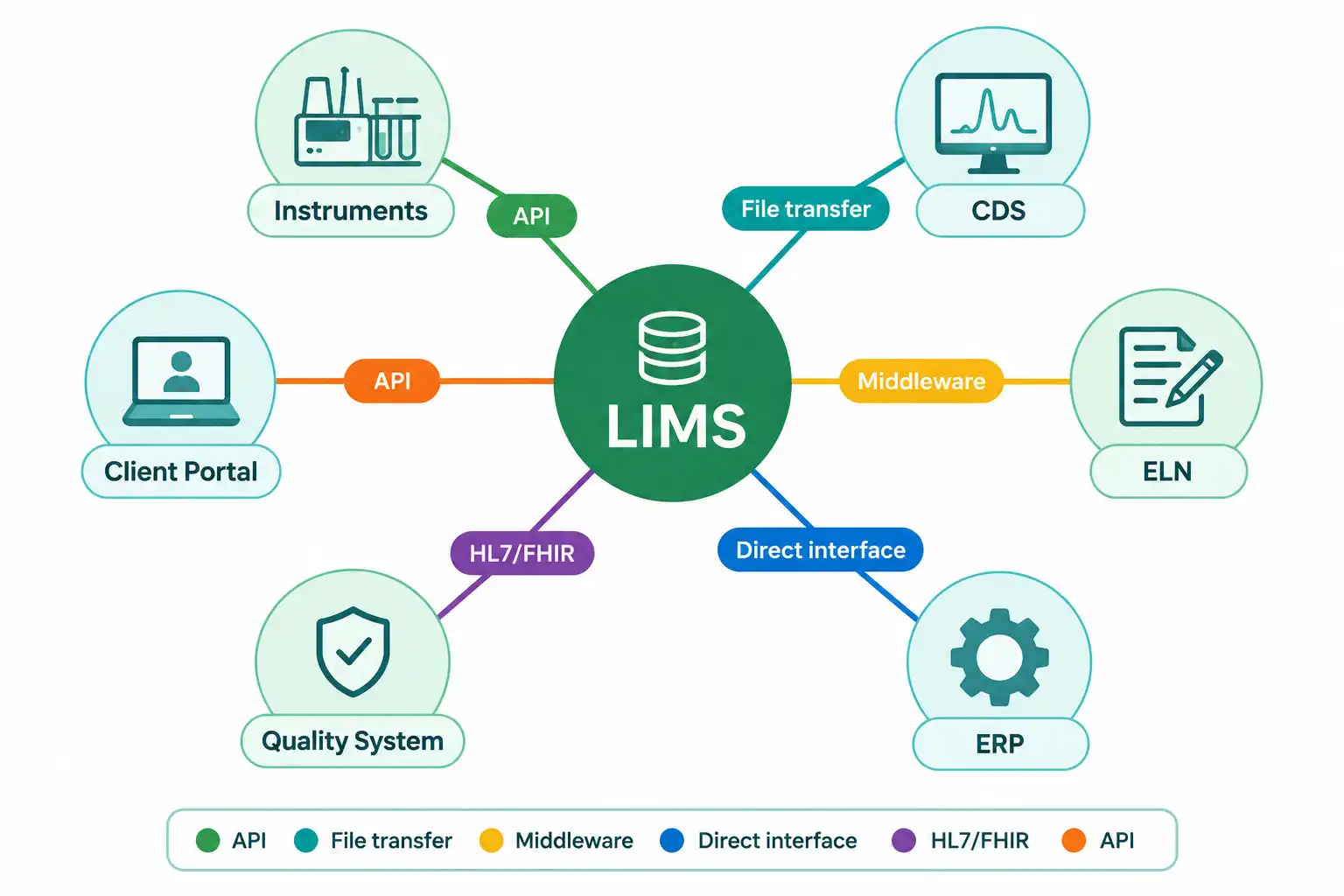 A better definition focuses on three things:
- What data moves (orders, sample details, raw results, calculated values, approvals, reports).
- Which direction it moves (into the LIMS, out of the LIMS, or both).
- How the exchange is controlled (validation, access rules, audit trails, error handling).
The ASTM guide on laboratory informatics (ASTM E1578) treats integration as a core topic. It covers communication and meaningful data exchange between laboratory informatics tools and external systems such as document management, chromatography data systems, instruments, ERP, manufacturing execution systems, and CAPA management (ASTM E1578-18).
Which systems does a LIMS commonly connect to?
The right integrations depend on the lab's work. The table below shows common pairings and what usually flows between them.
| Connected system | What typically flows to the LIMS | What typically flows from the LIMS |
|---|---|---|
| Analytical instruments | Raw results, run status, instrument IDs | Worklists, sample IDs, method details |
| Chromatography data system (CDS) | Processed peak results, sequence data | Sample lists, sample metadata |
| Electronic lab notebook (ELN) | Experimental context, observations | Sample and test records, final results |
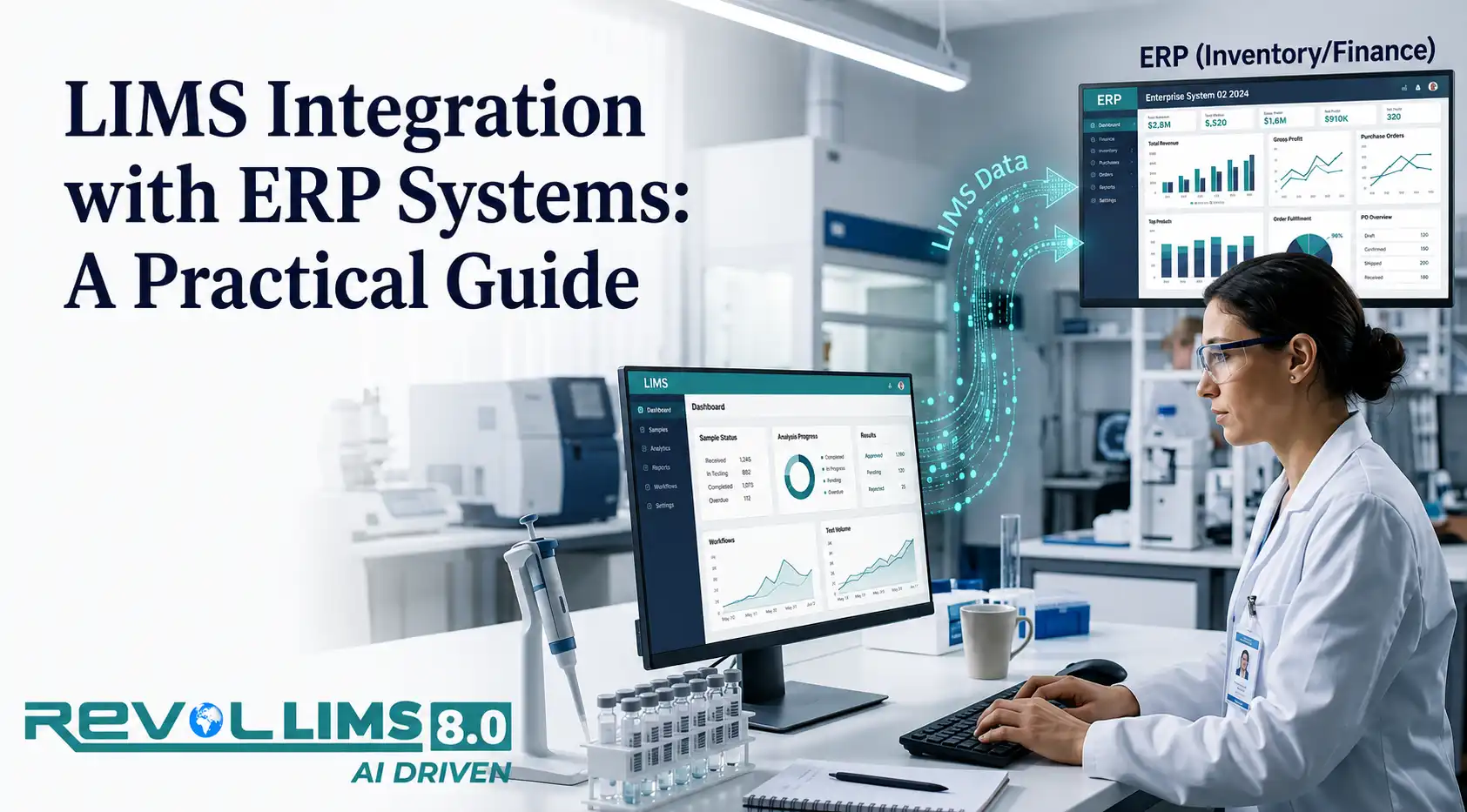
| ERP / inventory systems | Material and lot information, orders | Test status, release decisions, consumption |
| Manufacturing execution system (MES) | Batch and production information | Quality status, release or hold decisions |
| Quality management system (QMS) | Deviation and CAPA references | Out-of-specification events, test data |
| Hospital or clinic systems (EHR/LIS) | Test orders, patient or case details | Final results, corrected reports |
| Document management system | Controlled methods, SOP versions | Method references used for testing |
| Customer or client portals | Requests, submissions | Reports, certificates, status updates |
| Scientific data management system (SDMS) | Archived raw files | Metadata linking files to samples |
Not every lab needs every connection. A food testing lab may care most about instruments, ERP, and customer portals. A clinical lab may prioritize analyzers and electronic health records. A research lab may focus on the ELN and data repositories.
How are these connections actually built?
Integration methods vary in cost, flexibility, and effort to maintain. Most labs use a mix.
| Method | How it works | Best suited for | Watch out for |
|---|---|---|---|
| Direct instrument interface | The LIMS talks to the instrument or its software through a driver or protocol | Instruments with stable, well-documented outputs | Instrument software updates can break the link |
| File-based transfer | One system writes a file (CSV, XML, TXT); the other reads it from a shared location | Legacy instruments, simple needs | Timing issues, file errors, weak traceability if unmanaged |
| Middleware / interface engine | A separate layer translates and routes messages between systems | Labs with many systems, healthcare environments | Another component to validate and monitor |
| API (often REST/JSON) | Systems call each other's published endpoints | Modern cloud and enterprise software | Version changes, authentication, rate limits |
| Standard messaging (HL7, FHIR) | Systems exchange structured messages in agreed formats | Clinical and public health exchange | Local variations in how the standard is applied |
| Database-level link | One system reads or writes another's tables directly | Rare, tightly controlled cases | Bypasses application logic, high risk for integrity |
Direct database writing deserves special caution. It can skip the business rules and audit trails built into the application. Most teams prefer APIs, supported interfaces, or middleware instead.
What is the difference between one-way and two-way integration?
In a one-way integration, data flows in a single direction. For example, an instrument sends results to the LIMS, but nothing returns.
In a two-way (bidirectional) integration, both systems send and receive. The LIMS sends a worklist to the instrument. The instrument returns results. The LIMS may then confirm receipt or flag a problem.
Two-way flows save more time. They also need more testing, since errors can travel in both directions.
Where Do Laboratories Face Integration Gaps?
Short answer: Laboratories most often struggle with manual data re-entry, inconsistent sample identifiers, fragile point-to-point connections, validation workload, and unclear ownership. These gaps rarely come from one faulty tool. They usually come from systems adopted at different times, for different reasons, without a shared data plan.
Integration problems tend to build slowly. A lab adds a new instrument. Someone writes a quick script. A spreadsheet becomes "temporary glue." Years later, nobody is sure how data moves.
Here are the gaps that appear most often.
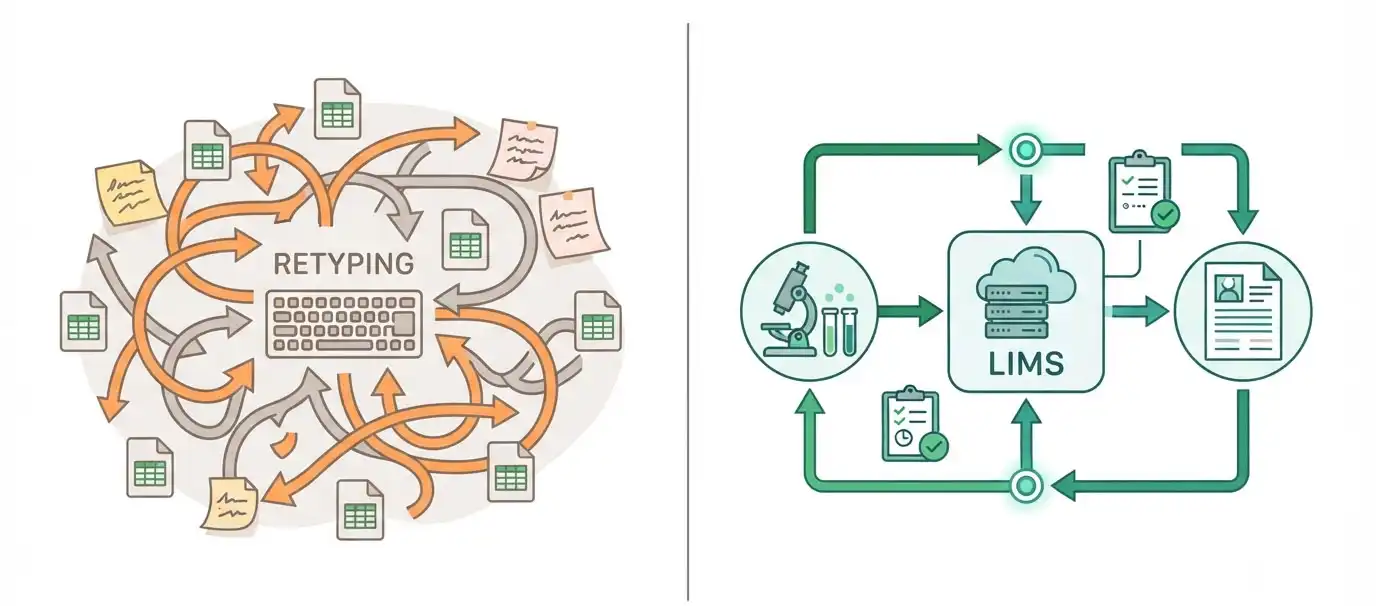
Manual transcription and spreadsheet hand-offs
When results are typed or pasted between systems, errors are likely. Even careful staff make mistakes under time pressure.
Manual steps also weaken traceability. A reviewer may see a final value but not know whether it was copied, edited, or recalculated along the way.
FDA's data integrity guidance for drug manufacturers defines data integrity as the completeness, consistency, and accuracy of data. It also says that data should be attributable, legible, contemporaneously recorded, original or a true copy, and accurate, a set of attributes known as ALCOA (FDA, Data Integrity and Compliance With Drug CGMP: Questions and Answers). Manual copying makes several of these attributes harder to prove. For a deeper look, see our guide to laboratory data integrity and ALCOA principles.
Point-to-point sprawl
Many labs connect each system directly to every other system. With three systems, that means three links. With ten systems, it can mean dozens.
Each link has its own logic, owner, and failure modes. A change in one system can quietly break another.
Inconsistent identifiers and master data
Systems must agree on what things are called. If the ERP uses one material code, the LIMS uses another, and the instrument uses a third, matching records becomes guesswork.
Common trouble spots include:
- Sample and batch IDs
- Test and method names
- Units of measure
- Product and specification codes
- Instrument and user IDs
Meaning, not just format
Two systems can exchange a file successfully and still disagree about what it means. A result may arrive without its units, detection limit, or qualifier.
The Clinical and Laboratory Standards Institute (CLSI) addresses this in its report on semantic interoperability for in vitro diagnostic systems. It discusses the use of standards such as LOINC In Vitro Diagnostic (LIVD), HL7 v2, and FHIR to help test results keep their meaning as they move between systems (CLSI AUTO17-Ed1).
Validation and change-control burden
Every interface that handles regulated or accredited data needs evidence that it works. That evidence must be refreshed when systems change.
If a lab has many undocumented interfaces, validation becomes slow and expensive. Updates get delayed because nobody wants to retest everything.
Unclear ownership
Who owns an interface when it fails at 2 a.m.? The lab? IT? The instrument vendor? The software provider?
Without a named owner, small issues linger until they become audit findings or reporting delays.
Summary of gaps and their impact
| Gap | Typical symptom | Business or compliance impact |
|---|---|---|
| Manual re-entry | Transcription errors, rework | Data integrity risk, slower turnaround |
| Point-to-point sprawl | Fixing one system breaks another | High maintenance cost, upgrade delays |
| Inconsistent IDs | Records fail to match | Lost or duplicated results |
| Missing context | Results without units or flags | Misinterpretation, incorrect decisions |
| Heavy validation load | Updates postponed | Outdated software, security exposure |
| Unclear ownership | Slow issue resolution | Missed deadlines, audit observations |
What Do Laboratories Need for Reliable LIMS Integration?
Short answer: Reliable integration needs five foundations: agreed data standards, clear governance, secure and validated interfaces, monitoring with error handling, and documentation that stays current. Technology choices matter, but labs that skip these foundations often rebuild their interfaces within a few years.
Good integration is rarely about picking the "best" tool. It is about meeting a set of practical requirements.
1. Agreed data standards and shared vocabularies
Standards reduce custom translation work. The right ones depend on the lab's sector.
- HL7 and FHIR support exchange between laboratory and healthcare systems. HL7 v2 messages, such as order and result messages, are still widely used. FHIR resources, such as Observation and DiagnosticReport, offer a more modern, web-based approach. Confirm exact message and resource definitions in the official HL7 specifications.
- LOINC provides standard codes for laboratory tests and observations, which helps different systems recognize the same test.
- SiLA 2 is a standard for laboratory device communication. It is described as addressing control and data interfaces between devices and process management, LIMS, and enterprise systems, using gRPC over HTTP/2 (Standardization in Lab Automation overview; Juchli, SiLA 2: The Next Generation Lab Automation Standard, 2022).
- AnIML, Allotrope, and OPC-UA LADS support standardized analytical data and device information. An ISPE article discusses them alongside SiLA 2 as part of laboratory automation standardization (ISPE, Laboratory Automation Plug and Play).
Many instruments still do not support these standards. Labs often need adapters, middleware, or custom parsing for older equipment. See also our overview of how instrument data capture works.
2. Data governance
Governance answers practical questions:
- Which system is the source of truth for each data type?
- Who approves changes to naming rules, units, and specifications?
- How are duplicates handled?
- How long is data retained, and where?
The FAIR principles offer a useful lens. They stress that data should be findable, accessible, interoperable, and reusable, with a specific emphasis on helping machines find and use data automatically.
3. Security and access control
Interfaces are doors into your systems. Each should have:
- Unique service accounts, not shared logins
- Least-privilege permissions
- Encrypted transport where supported
- Secrets (passwords, tokens) stored securely
- Logging of who or what sent each record
4. Validation and change control
Interfaces that handle accredited or regulated data should be tested and documented. Our guide to validating laboratory software covers the wider process.
ISO/IEC 17025:2017, clause 7.11, covers control of data and information management. In summary, it expects laboratory information management systems to be validated for functionality, including the proper functioning of interfaces. It also expects them to be protected from unauthorized access, safeguarded against tampering and loss, and maintained so data integrity is preserved. System failures and the actions taken should be recorded. When a system is run off-site or by an external provider, the laboratory must make sure the provider meets the applicable requirements (ISO/IEC 17025:2017). Check the licensed standard text for exact wording.
5. Monitoring, error handling, and documentation
Interfaces fail. Networks drop, files arrive malformed, and instruments restart. A reliable design assumes this and plans for it.
At a minimum, define:
- How failures are detected and who is alerted
- Whether messages are retried or queued
- How rejected records are reviewed and corrected
- How the lab proves nothing was lost
How do key regulations and standards relate to integration?
| Source | Relevance to integration | What labs should consider |
|---|---|---|
| ISO/IEC 17025:2017 (cl. 7.11) | Validation of information systems, including interfaces; protection of data | Interface validation, access control, failure records |
| FDA data integrity guidance (2018, drug CGMP) | Expectations for complete, consistent, accurate data (ALCOA) | Audit trails, original data, review of data flows |
| 21 CFR Part 11 | Criteria for trustworthy electronic records and signatures in FDA-regulated settings | Audit trails, access limits, signature controls |
| ASTM E1578-18 | Guide to laboratory informatics, including integration and life cycle | Requirements gathering, IT involvement, lifecycle planning |
| FAIR principles | Principles for reusable, machine-actionable data | Metadata, identifiers, interoperability |
Regulatory applicability depends on your sector and jurisdiction. Part 11, for example, covers electronic records and signatures used in place of paper records under FDA requirements, and the final rule was published in the Federal Register on March 20, 1997 (eCFR, 21 CFR Part 11; Federal Register, Vol. 62, No. 54). The FDA data integrity guidance was developed in response to an increase in data integrity lapses found in inspections (FDA). Consult your quality and regulatory teams about which rules apply to you. If you are preparing for an assessment, see preparing for ISO/IEC 17025 assessment.
How Does a Structured Workflow Support Reliable, Compliant Data Exchange?
Short answer: A structured workflow defines each step data takes, from sample registration to archived report, and states which system owns each step. When every hand-off has a clear rule, owner, and record, integration becomes easier to validate, monitor, and audit. Fewer manual touches also mean fewer opportunities for error.
Think of integration as a pipeline. Each stage has an input, a check, and an output.
What does an integrated sample-to-report flow look like?
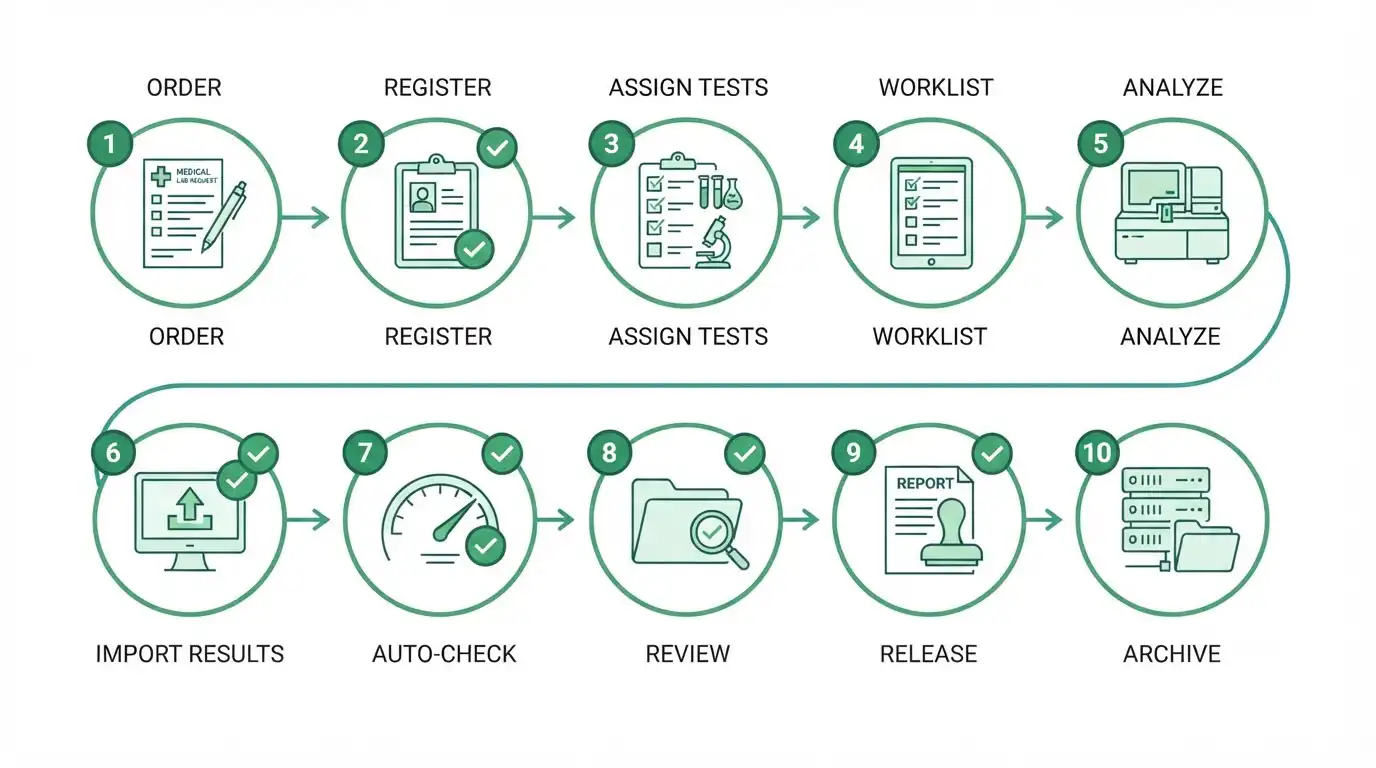 The exact steps vary by lab. The pattern below fits many testing environments.
- Request or order arrives. A customer portal, ERP, or clinical system sends a request. The LIMS validates the fields and creates the sample record.
- Sample is registered and labeled. The LIMS assigns a unique ID. The ID is printed on a label or encoded in a barcode.
- Tests are assigned. Based on product, method, or specification, the LIMS selects the tests. It checks that controlled method versions are current, drawing from a document management system if connected.
- Worklists go to instruments. The LIMS sends sample IDs and test details to the instrument or its software. This avoids retyping.
- Analysis runs. The instrument or CDS produces raw and processed data.
- Results return to the LIMS. The interface parses the data, matches it to the right sample and test, and stores it with metadata such as instrument ID, analyst, and timestamp.
- Automatic checks run. The LIMS compares values to limits, flags out-of-range results, and may trigger a deviation or CAPA record in the QMS.
- Review and approval happen. Authorized staff review the data and approve it. Electronic signatures and audit trails record who did what and when.
- Results are released and reported. The LIMS shares final results with ERP, MES, EHR, or a client portal, and generates the report or certificate.
- Data is archived. Raw files, metadata, and reports are stored for the required retention period, with links back to the sample record.
Where should checks and controls sit?
Place controls where errors are cheapest to catch.
| Stage | Example control | Why it helps |
|---|---|---|
| Intake | Required fields, valid product codes | Stops bad data at the door |
| Worklist | Barcode scan confirmation | Reduces sample mix-ups |
| Result import | Unit check, ID match, duplicate detection | Prevents mismatched or repeated data |
| Review | Audit trail visible to the reviewer | Supports independent review |
| Release | Approval rules by role | Enforces separation of duties |
| Archive | Checksum or integrity check on files | Confirms files are unchanged |
How do error handling and exceptions fit in?
Exceptions are normal. The workflow should say what happens when:
- A sample ID in the instrument file is not found in the LIMS
- A result arrives twice
- A value is outside the instrument's reportable range
- An interface is down during a run
- A result is corrected after release
Good designs route these cases to a review queue with a clear owner. They do not silently drop data or overwrite it. Corrections should create a new, traceable version rather than erasing the original.
How does this support compliance and audits?
A structured workflow gives auditors and assessors something concrete to examine. You can show:
- A data-flow diagram for each regulated process
- Interface specifications and test evidence
- Access lists and role definitions
- Audit trails across systems
- Records of failures and corrective actions
This lines up with the ISO/IEC 17025 expectation that information systems, including interfaces, are validated and failures are recorded. It also supports the FDA focus on attributable, original, and accurate data.
How Do You Get Started with LIMS Integration?
Short answer: Start by mapping your current data flows, then rank possible integrations by value and risk. Choose one high-impact, low-complexity interface as a pilot. Define requirements with both lab and IT staff, validate the interface, measure results, and use what you learn to plan the next connection.
You do not need a large program to begin. A clear, staged approach works better.
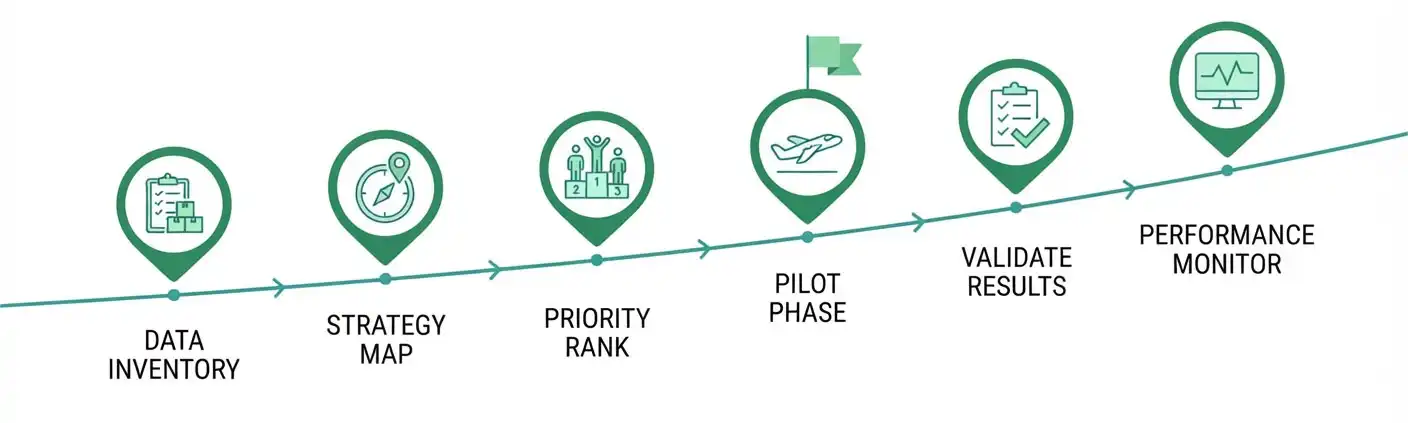
Step-by-step plan
- Inventory your systems. List every system that creates, stores, or uses lab data. Include spreadsheets and paper logs. Note the owner and version of each.
- Map current data flows. Draw how data moves today. Mark manual steps, file transfers, and workarounds.
- Identify pain points. Ask analysts, reviewers, and IT where time is lost or errors occur. Look for repeated transcription and frequent corrections.
- Rank candidates. Score each possible integration on value (time saved, risk reduced) and effort (technical difficulty, validation load).
- Pick a pilot. Choose one interface with strong value and manageable complexity. Instruments with high sample volume are common candidates.
- Write requirements. Specify the data fields, direction, timing, error handling, security, and acceptance criteria. Involve lab staff, QA, and IT.
- Design, build, and test. Test normal cases and edge cases, such as duplicates, missing fields, and system outages.
- Validate and document. Record the interface specification, test evidence, and approval in line with your quality system.
- Train and go live. Train users on the new flow and on what to do if the interface fails.
- Monitor and review. Track error rates, turnaround time, and rework. Review after a few months and adjust.
ASTM E1578 notes that selecting laboratory informatics solutions requires detailed analysis of laboratory requirements rather than a simple product-category decision. It also recommends involving IT staff and subject matter experts, and including internal and external customers of lab information in solution design (ASTM E1578-18). For help comparing options, read our guide on choosing laboratory informatics tools.
How should you prioritize which integration comes first?
A simple scoring grid can guide the conversation.
| Candidate integration | Value if automated | Technical effort | Validation effort | Suggested priority |
|---|---|---|---|---|
| High-volume instrument to LIMS | High | Medium | Medium | Start here |
| LIMS to client portal (reports) | Medium | Medium | Low | Early |
| LIMS to ERP (material release) | High | High | High | Plan carefully |
| Legacy instrument via file transfer | Medium | Low | Medium | Good quick win |
| LIMS to QMS (deviations) | Medium | Medium | Medium | Mid-term |
Treat this as a conversation starter. Your own scores will differ.
What questions should you ask before you commit?
For the lab team
- Which manual steps cause the most errors or delays?
- What does a reviewer need to see to trust an imported result?
- What should happen when something goes wrong?
For IT
- Does each system offer a supported API or interface?
- How will credentials be managed and rotated?
- How will upgrades be tested against the interface?
For QA and compliance
- Which interfaces handle accredited or regulated data?
- What validation evidence will assessors expect?
- How will changes be controlled over time?
For decision-makers
- Who owns each interface after go-live?
- What is the support plan for the instrument and software lifecycle?
- How will success be measured?
Common mistakes to avoid
- Starting with the hardest integration first
- Building custom code when a standard or supported connector exists
- Skipping edge-case testing
- Leaving interface documentation until the end
- Forgetting to plan for software upgrades
- Not naming an owner
Frequently Asked Questions
Short answer: Lab teams most often ask how LIMS integration differs from simple data export, whether older instruments can connect, how standards such as ISO/IEC 17025 apply, and who should own interfaces. The answers below are brief and practical, so readers can find the point quickly and check the details against their own requirements.
What is the difference between a LIMS and a LIS?
A LIMS typically supports laboratories that test samples across industries, such as environmental, food, and manufacturing. A laboratory information system (LIS) usually refers to clinical or hospital laboratory software focused on patient testing. The boundaries overlap, and ASTM E1578 notes that the lines between tool types continue to blur.
Can a LIMS connect to older instruments?
Often, yes. Older instruments may not offer modern interfaces, but many can export files or serial output. Labs commonly use file parsing, serial-to-network converters, or middleware. These setups usually need more testing and monitoring than modern API-based connections, so validate them carefully.
Do we need middleware to integrate a LIMS?
Not always. A lab with a few simple connections may manage with direct interfaces or APIs. Middleware becomes more useful as the number of systems grows, or when you must translate between formats, route messages, and monitor traffic in one place.
How do we keep integrations compliant with ISO/IEC 17025?
Treat interfaces as part of your information system. Validate their function, restrict access, protect against tampering and loss, and record failures and corrective actions. Document the data flow and keep evidence current. Review the licensed standard and your accreditation body's guidance for specifics.
What is the role of HL7 and FHIR in lab integration?
HL7 and FHIR define how healthcare systems exchange structured data. In laboratory settings, they commonly carry test orders and results between laboratory systems and clinical systems. Many sites use HL7 v2 alongside newer FHIR interfaces. Local profiles vary, so confirm requirements with your trading partners.
How long does a LIMS integration project take?
It depends on the interface, the quality of the source system's documentation, and the validation required. A simple file-based instrument link may take far less time than an ERP integration. Build in time for requirements, testing, validation, and training rather than only for coding.
Who should own integrations after go-live?
Assign a named owner for each interface, typically a role in the lab or IT with authority to manage changes. Define support contacts, escalation steps, and a review schedule. Shared ownership without a lead is a common reason for slow issue resolution.
Conclusion
LIMS integration is less about linking software and more about moving trustworthy data. When instruments, notebooks, quality systems, and enterprise platforms share information in a controlled way, labs reduce rework and strengthen traceability.
The main points to remember: define what data moves, in which direction, and under whose control. Use standards where they exist, and plan for older equipment. Validate and document interfaces, since standards such as ISO/IEC 17025 expect it. Build governance around identifiers, ownership, and change control. Then start with a focused pilot, learn from it, and expand step by step.
A clear map of your current data flows is the best first move. It shows where effort will pay off and where risk is hiding.
Want to put this into practice?
Create a one-page data-flow map of your lab: list each system, what it sends, what it receives, and which steps are still manual. Share it with your QA and IT colleagues and use the prioritization table above to choose a pilot.
Start with one interface, learn from it, then expand.
Sources
- ISO/IEC 17025:2017, General requirements for the competence of testing and calibration laboratories
- FDA, Data Integrity and Compliance With Drug CGMP: Questions and Answers (December 2018)
- eCFR, 21 CFR Part 11: Electronic Records; Electronic Signatures
Author: Revol LIMS Team . marketing@revollims.com . www.revollims.com