Understanding LIMS Implementation: What It Really Means
Defining LIMS Implementation
LIMS implementation encompasses the complete process of deploying laboratory information management software within your organisation. This goes far beyond simply installing software on servers or activating cloud accounts. True implementation includes selecting the optimal LIMS platform aligned with laboratory requirements, configuring the system to mirror your specific workflows and processes, integrating the LIMS with existing analytical instruments and enterprise systems, migrating historical data from spreadsheets or legacy systems, validating system performance to ensure accuracy and compliance, training all personnel on system functionality and procedures, and establishing governance processes for ongoing system administration.
Successful implementation transforms how your laboratory operates at fundamental levels, automating manual processes that historically consumed significant staff time, eliminating transcription errors that compromise data integrity, enforcing standardised workflows that ensure consistent quality, enabling real-time visibility into laboratory operations and performance, and creating defensible audit trails that satisfy regulatory requirements.
Cloud vs. On-Premise Implementation Differences
Implementation approaches differ significantly based on deployment architecture.
Cloud-Based LIMS Implementation proceeds more rapidly because infrastructure setup is eliminated entirely, with no servers to procure, configure, or validate. The vendor handles system hosting, security, and maintenance responsibilities. Implementation focuses primarily on configuration, integration, data migration, and training. Typical cloud implementations take 8 to 12 weeks for small to mid-sized laboratories. Cloud deployments scale effortlessly, adding users or capacity without hardware procurement. Automatic updates ensure you always operate on current software versions without manual upgrade projects.
On-Premise LIMS Implementation requires significantly longer timelines due to infrastructure requirements. Organisations must procure and configure servers, install and configure database software, establish backup and disaster recovery infrastructure, implement network security measures, and deploy the LIMS application software. These infrastructure steps typically add 4 to 8 weeks minimum to implementation timelines. On-premise implementations provide complete control over software and data but demand dedicated IT resources for ongoing administration. Organisations typically choose on-premise when regulatory requirements mandate data residency, existing IT infrastructure investments should be leveraged, internet connectivity is unreliable, or organisational policies prohibit cloud services.
Modern implementations increasingly favour cloud deployment for speed, flexibility, and reduced total cost of ownership. This guide focuses primarily on cloud LIMS implementation while noting critical differences for on-premise projects.
The Phased Implementation Approach
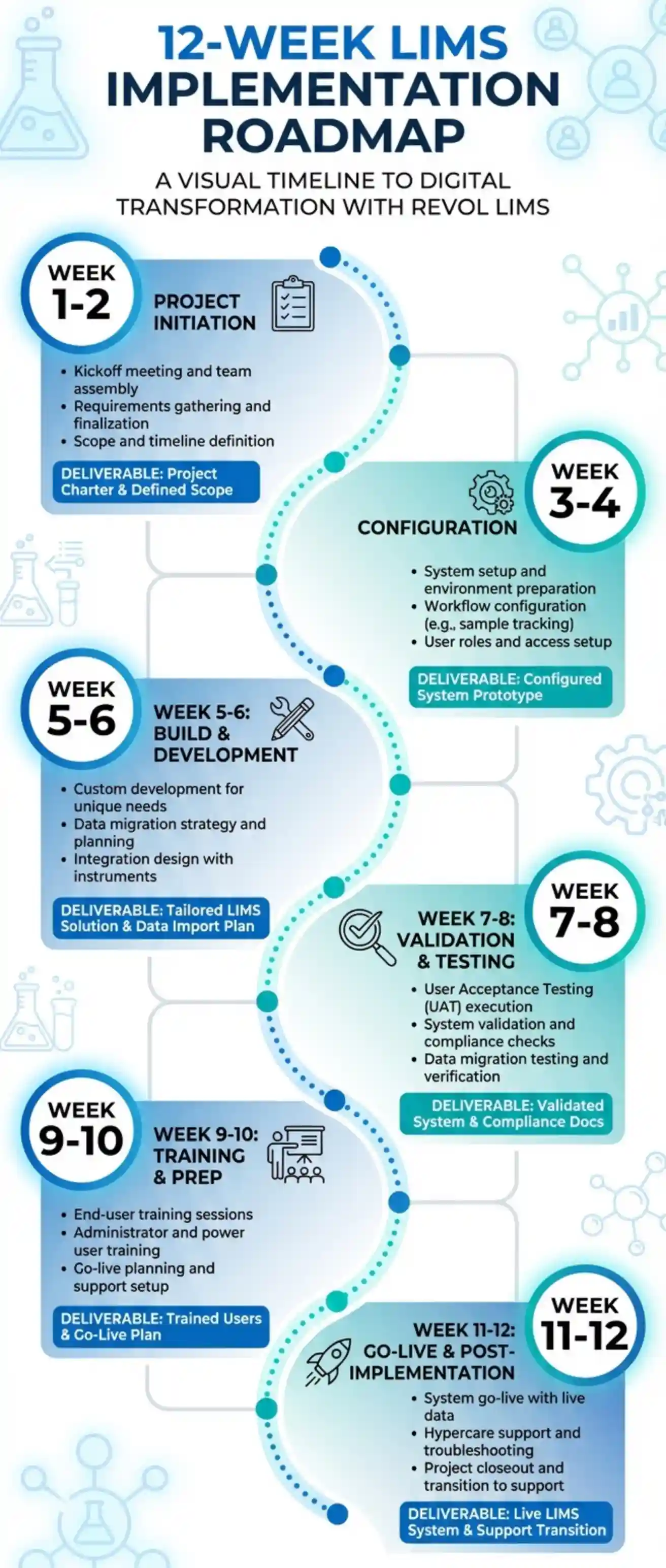
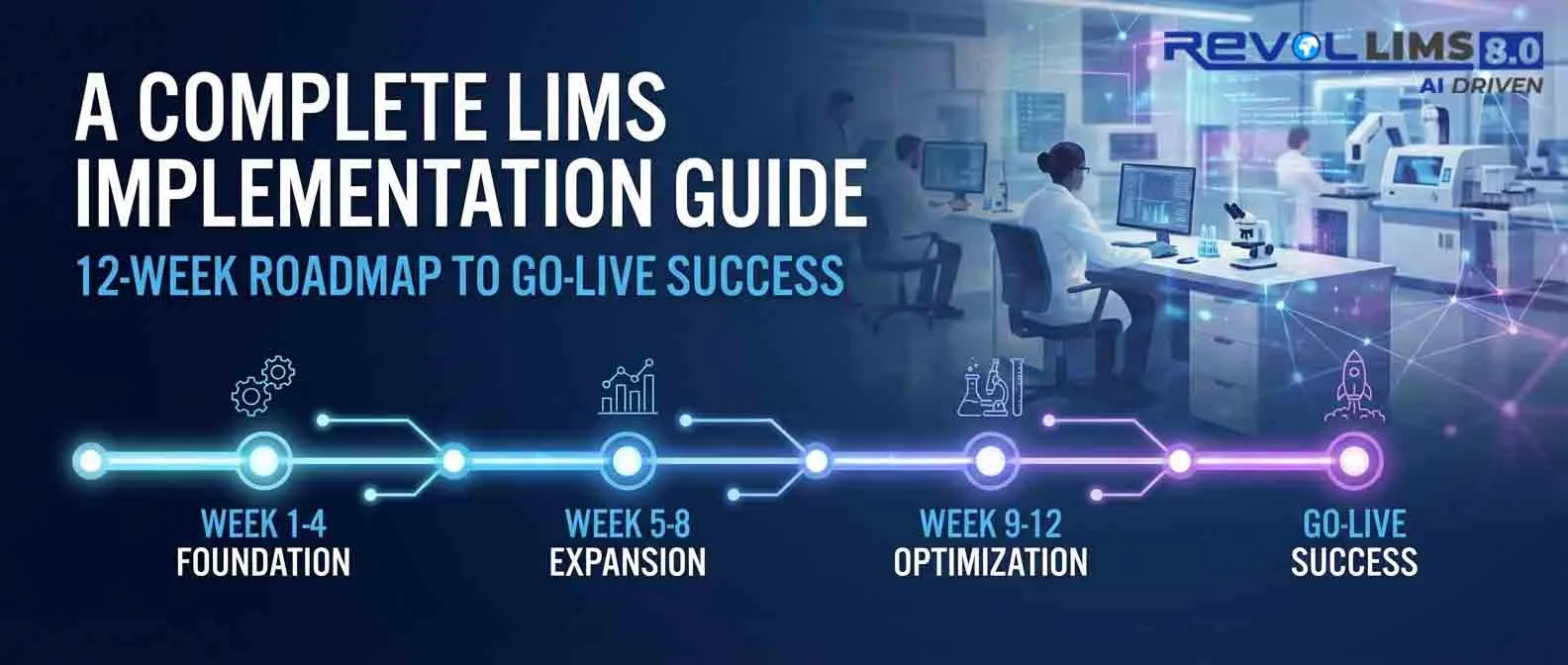
Successful LIMS implementations follow phased methodologies rather than attempting complete transformation simultaneously. The phased approach delivers incremental value, enabling laboratories to realise benefits progressively. It reduces project risk by tackling manageable scopes rather than overwhelming comprehensive changes. It builds user confidence through early successes before advancing to complex functionality. It allows course correction based on lessons learned in earlier phases.
Typical Phased Progression:
Phase 1 - Foundation (Weeks 1-4): Core sample management, basic workflow configuration, essential instrument integrations, and fundamental reporting.
Phase 2 - Expansion (Weeks 5-8): Advanced workflows, additional instrument connections, inventory management, and customised reporting.
Phase 3 - Optimisation (Weeks 9-12): Quality control automation, analytics dashboards, client portals, and process refinement.
Phase 4 - Enhancement (Post Go-Live): Advanced features, additional modules, continuous improvement, and expanded capabilities.
This phased strategy prevents overwhelming users and IT resources while maintaining project momentum toward successful go-live.
Pre-Implementation Planning: Setting the Foundation for Success
Establishing Clear Implementation Objectives
Every successful LIMS implementation starts with crystal-clear objectives articulating exactly what you intend to achieve. Vague aspirations like "improve laboratory efficiency" provide insufficient guidance for decision-making throughout the project.
Effective LIMS Objectives Follow the SMART Framework:
- Specific: Reduce average sample turnaround time from 72 hours to 48 hours.
- Measurable: Eliminate 90 per cent of manual data transcription errors.
- Achievable: Decrease time spent on monthly reporting from 16 hours to 2 hours.
- Relevant: Achieve ISO 17025 accreditation by implementing required quality systems.
- Time-Bound: Complete implementation and achieve go-live within 12 weeks.
Document 3 to 5 primary objectives representing the core business drivers justifying your LIMS investment. These objectives guide configuration decisions, feature prioritisation, and success measurement.
Common Laboratory LIMS Objectives Include:
Operational Efficiency: Automate manual processes consuming excessive staff time, increase laboratory testing capacity without proportional staff increases, and reduce sample turnaround time to improve client satisfaction.
Quality and Compliance: Achieve or maintain regulatory accreditation (ISO 17025, CAP, CLIA), eliminate data transcription errors compromising result accuracy, and establish complete audit trails for regulatory inspections.
Business Growth: Increase testing capacity to support revenue growth, improve client service through faster results and better communication, and enable multi-site expansion with centralised management.
Data Management: Create centralized repository replacing fragmented spreadsheets, enable rapid data retrieval for investigations and audits, and improve decision-making through real-time operational visibility.
Assembling Your LIMS Implementation Team
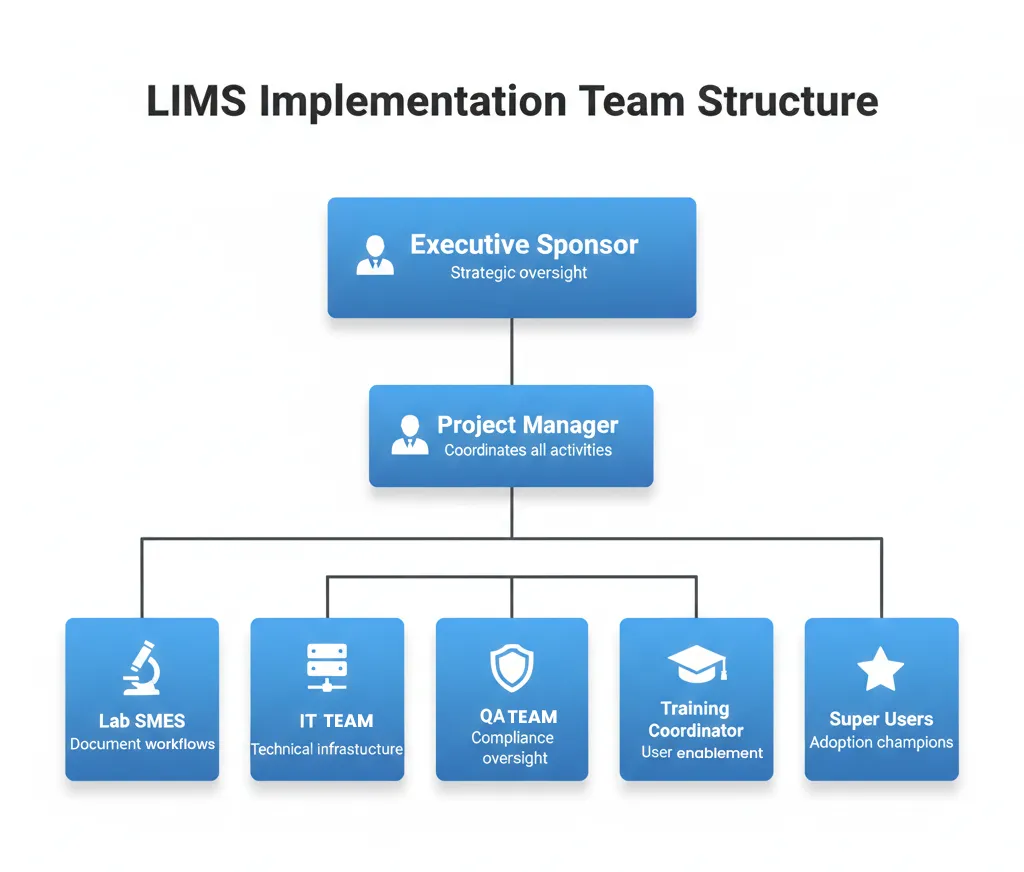
LIMS implementation success depends critically on having the right people involved with clearly defined roles and responsibilities. Implementation failures frequently trace to inadequate team composition or unclear accountability.
Core Implementation Team Roles:
Executive Sponsor provides strategic oversight and organisational authority, secures budget and resources for the project, resolves escalated issues and removes obstacles, communicates project importance to the broader organisation, and makes final decisions on scope and priorities. The executive sponsor should be a senior leader (Laboratory Director, VP of Operations, or equivalent) with genuine authority and vested interest in project success.
Project Manager develops and maintains the detailed project plan, coordinates all implementation activities and stakeholders, monitors progress against timelines and budgets, manages risks and issues throughout the project, and serves as primary contact with the LIMS vendor. The project manager must possess strong organisational skills, a technical understanding of laboratory operations, and the ability to drive cross-functional collaboration.
Laboratory Subject Matter Experts document current workflows and requirements, provide input on system configuration decisions, validate that configurations meet operational needs, participate in user acceptance testing, and serve as super users post-implementation. Include representatives from all laboratory areas affected by LIMS, including sample receiving, testing, quality assurance, and client services.
IT Representative addresses technical requirements and infrastructure needs, supports system installation for on-premise deployments, configures network access and security settings, troubleshoots technical issues during implementation, and plans for ongoing system administration. Even for cloud deployments, IT involvement ensures proper integration with enterprise systems and network infrastructure.
Quality Assurance Representative ensures compliance with regulatory requirements, reviews validation protocols and documentation, participates in system testing and verification, and approves validation completion before go-live. Critical for regulated laboratories operating under FDA, ISO, or other quality standards.
The Training Coordinator develops training plans and materials, schedules and delivers user training sessions, assesses training effectiveness, and provides post-go-live training support. May be a dedicated role or responsibility assigned to a subject matter expert.
Effective Team Size and Structure:
Small Laboratories (less than 10 staff): 2 to 4 team members with individuals wearing multiple hats.
Medium Laboratories (10 to 50 staff): 4 to 8 team members with defined role separation. Large Laboratories (50 plus staff): 8 to 15 team members with specialised responsibilities and possibly sub-teams for different laboratory areas.
Documenting Current State and Future Vision
A thorough understanding of your current operations and a clear vision for the future state guide every implementation decision.
Current State Assessment Activities:
Workflow Mapping: Document existing laboratory processes from sample receipt through final report delivery. Create detailed flowcharts showing each step, decision point, and handoff. Identify pain points, bottlenecks, redundancies, and inefficiencies in current workflows.
System Inventory: Catalogue all current systems touching laboratory operations, including spreadsheets tracking samples or data, legacy LIMS or laboratory software, analytical instrument software, ERP or billing systems, client communication tools, and manual paper-based processes.
Data Assessment: Evaluate existing laboratory data, including historical data requiring migration, current data volumes and growth projections, data formats and structures, data quality issues requiring cleanup, and regulatory retention requirements.
Requirements Gathering: Engage all stakeholder groups to capture comprehensive requirements through structured interviews, workshops, observation of current processes, review of standard operating procedures, analysis of regulatory requirements, and competitive benchmarking if applicable.
Requirement Categories:
- Functional Requirements: Specific capabilities the LIMS must provide (sample tracking, result entry, report generation, etc.).
- Technical Requirements: Integration needs, performance expectations, security requirements, and scalability parameters.
- Regulatory Requirements: Compliance mandates (21 CFR Part 11, ISO 17025, GLP, etc.).
- Usability Requirements: User experience expectations, accessibility needs, and mobile requirements.
- Business Requirements: Budget constraints, timeline expectations, and ROI targets.
Requirement Prioritisation:
Categorise each requirement as Must-Have (non-negotiable requirements for go-live), Should-Have (important features desirable for initial deployment), or Nice-to-Have (enhancements that can be added post-implementation).
This prioritisation prevents scope creep while ensuring critical functionality launches at go-live.
Developing the Implementation Budget
Comprehensive budget planning prevents cost overruns that plague many LIMS implementations.
Cloud-Based LIMS Budget Components:
Software Subscription: Annual or monthly LIMS license fees based on user count, sample volume, or laboratory size.
Implementation Services: Vendor professional services for configuration, training, and deployment support. Typically $20,000 to $150,000, depending on complexity.
Integration Development: Custom development for instrument interfaces and enterprise system connections. $5,000 to $50,000 per integration.
Data Migration: Services for extracting, cleansing, and loading historical data. $10,000 to $75,000 depending on data volume and quality.
Validation Services: For regulated laboratories requiring formal system validation. $15,000 to $75,000 for comprehensive validation packages.
Training: User training programs, materials development, and ongoing education. $5,000 to $25,000.
Internal Resources: Staff time devoted to implementation activities. Calculate the fully-loaded cost of team member hours.
Contingency: Reserve 15 to 20 per cent of the total budget for unexpected costs and change requests.
On-Premise LIMS Additional Costs:
Software Licenses: Perpetual licenses typically range from $100,000 to $500,000, plus, depending on laboratory size.
Hardware Infrastructure: Servers, storage, backup systems, and network equipment. $25,000 to $150,000.
Database Licensing: SQL Server, Oracle, or other database software. $10,000 to $50,000.
Annual Maintenance: Ongoing support and updates, typically 15 to 20 per cent of license cost annually.
IT Infrastructure Costs: Dedicated IT staff time, facilities (power, cooling, space), and ongoing maintenance.
Budget Management Best Practices:
Obtain detailed quotes from multiple vendors for accurate cost comparisons. Include internal costs (staff time, facilities), not just vendor charges. Plan for post-implementation costs, including ongoing subscriptions, support, and enhancements. Secure budget approval before formal vendor selection. Establish a formal change control process to manage scope changes affecting the budget. Track actual spending against the budget throughout implementation.
The 12-Week LIMS Implementation Roadmap
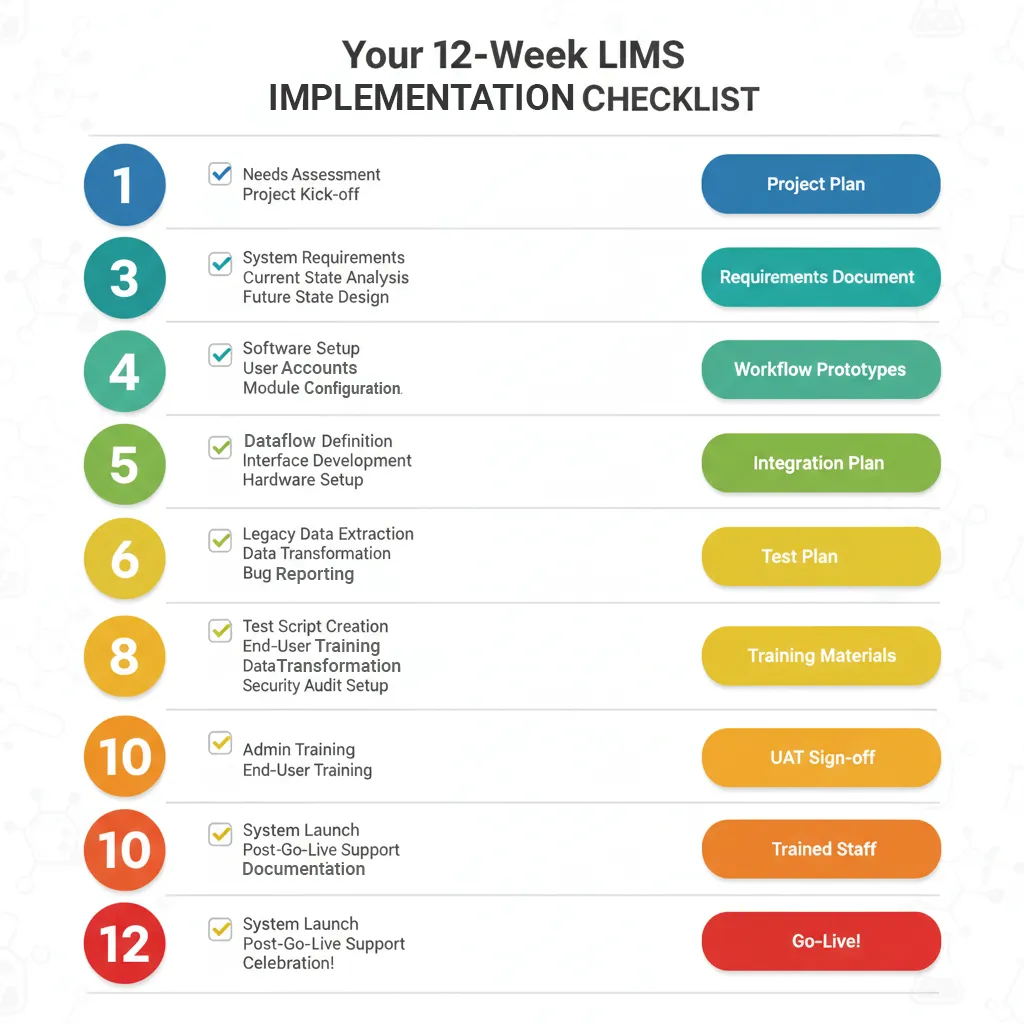
This section provides a detailed week-by-week roadmap for cloud-based LIMS implementation. On-premise implementations typically add 4 to 8 weeks for infrastructure setup.
Weeks 1-2: Project Initiation and Requirements Finalisation
Week 1 Activities:
Project Kickoff Meeting assembles the complete implementation team, including laboratory staff, IT representatives, quality assurance personnel, vendor implementation specialists, and executive stakeholders. The meeting establishes project governance structure and decision-making authority, reviews the implementation methodology and timeline, confirms roles, responsibilities, and time commitments, and addresses initial questions and concerns.
Formal Requirements Review validates all documented requirements with stakeholders, prioritises requirements as must-have, should-have, or nice-to-have, resolves any conflicting requirements or ambiguities, documents requirements in a formal specification document, and obtains stakeholder sign-off on final requirements.
Initial System Access includes provisioning a cloud LIMS environment for team access, establishing user accounts for implementation team members, configuring basic security and access controls, and providing vendor access for remote configuration support.
Communication Planning develops a communication plan for broader laboratory staff, establishes a regular project status meeting schedule, creates communication channels (email lists, shared drives, collaboration tools), and prepares announcements about the LIMS implementation project.
Week 1 Deliverables:
Signed project charter, finalised requirements specification document, implementation project plan with detailed timeline, communication plan, and risk register.
Week 2 Activities:
Workflow Mapping Workshops conduct detailed sessions mapping each laboratory workflow, document current process steps, decision points, and handoffs, identify desired future state with LIMS automation, create visual workflow diagrams for configuration reference, and validate workflows with front-line laboratory staff.
Data Migration Planning identifies all data sources requiring migration, assesses data quality and cleanup needs, develops data mapping from source systems to LIMS, creates a data migration plan and timeline, and assigns data cleanup responsibilities.
Integration Requirements Detailing inventories of all laboratory instruments requiring integration, documents communication protocols and data formats, identifies enterprise systems for integration (ERP, CRM, etc.), prioritises integrations for initial vs. phased deployment, and develops an integration testing plan.
raining Needs AssessmentT identifies different user groups and their training needs, determines training delivery methods (in-person, online, hybrid), plans training schedule around implementation timeline, and begins developing training materials and documentation.
Week 2 Deliverables:
Complete workflow documentation, data migration plan, integration specifications, and training plan outline.
Weeks 3-4: System Configuration Foundation
Week 3 Activities:
Core System Configuration sets up organisational structure (departments, locations, personnel), configures user roles and security permissions, establishes sample types and categories, defines test methods and parameters, creates specification limits and acceptance criteria, and configures naming conventions and terminology.
Workflow Configuration builds sample login workflows in the system, configures test assignment and scheduling logic, establishes review and approval pathways, implements QC sample workflows, and sets up notification and alert rules.
Laboratory Personnel Setup creates user accounts for all laboratory staff, assigns appropriate roles and permissions, configures electronic signature settings, sets up email notifications and preferences, and provides initial system orientation.
Vendor Configuration Support conducts daily working sessions with the vendor implementation team, reviews configuration progress and validates accuracy, addresses configuration questions and issues, and documents system setup decisions.
Week 3 Deliverables:
Configured organisational structure, established user accounts and permissions, and implemented basic workflows.
Week 4 Activities:
Report Template Configuration identifies required report types (certificates of analysis, batch reports, management summaries), configures report templates with branding and formatting, builds calculation formulas and data aggregations, establishes report distribution rules, and tests report generation with sample data.
Inventory Module Setup configures reagent and consumable catalogues, establishes storage locations and tracking protocols, sets up reorder points and alerts, implements lot and expiration date tracking, and configures vendor and purchasing information.
Quality Control Configuration establishes QC sample types and schedules, configures control charts and statistical rules, sets up out-of-control response workflows, implements calibration tracking and scheduling, and establishes proficiency testing management.
Initial Testing conducts internal testing of configured workflows, validates data flow through complete processes, identifies configuration issues requiring correction, and documents bugs or enhancement requests.
Week 4 Deliverables:
Configured reports, inventory system, QC modules, and documented testing results.
Weeks 5-6: Integration and Data Migration
Week 5 Activities:
Instrument Interface Development configures connections to priority analytical instruments, tests bidirectional communication (test orders and results), validates result import accuracy and formatting, implements error handling and exception management, and documents instrument interface procedures.
Enterprise System Integration establishes ERP or billing system connections, configures customer and order data synchronisation, tests data exchange workflows, validates data accuracy and completeness, and implements monitoring and error alerting.
Data Migration Execution executes data extraction from legacy systems, performs data cleansing and transformation, loads data into the LIMS test environment, validates data accuracy and completeness, addresses data quality issues identified, and prepares for production data migration.
Integration Testing tests complete workflows with integrated instruments, validates data flow from instrument through LIMS to reports, tests integration error handling and recovery, documents integration test results, and resolves integration issues identified.
Week 5 Deliverables:
Operational instrument interfaces, enterprise system integrations, and migrated historical data in the test environment.
Week 6 Activities:
Additional Integrations completes remaining instrument connections, implements mobile app deployment if applicable, configures client portal access if included, and finalises all planned integrations.
Data Validation validates migrated data accuracy against source systems, reconciles discrepancies and makes corrections, obtains stakeholder sign-off on data migration, and prepares the final production data migration plan.
Advanced Feature Configuration implements advanced reporting and analytics, configures management dashboards, sets up automated scheduling and notifications, and enables any additional modules.
System Performance Testing tests system performance under load conditions, validates response times meet requirements, identifies any performance bottlenecks, and implements performance optimisations.
Week 6 Deliverables:
All integrations are operational and tested, validated historical data, configured advanced features, and performance testing is complete.
Weeks 7-8: Validation and Testing
Week 7 Activities:
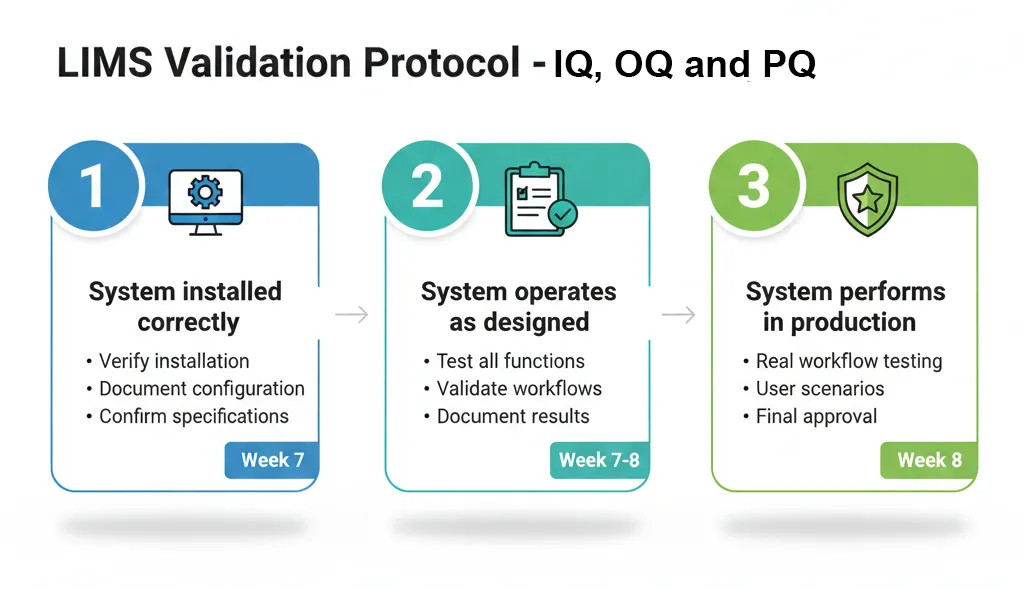
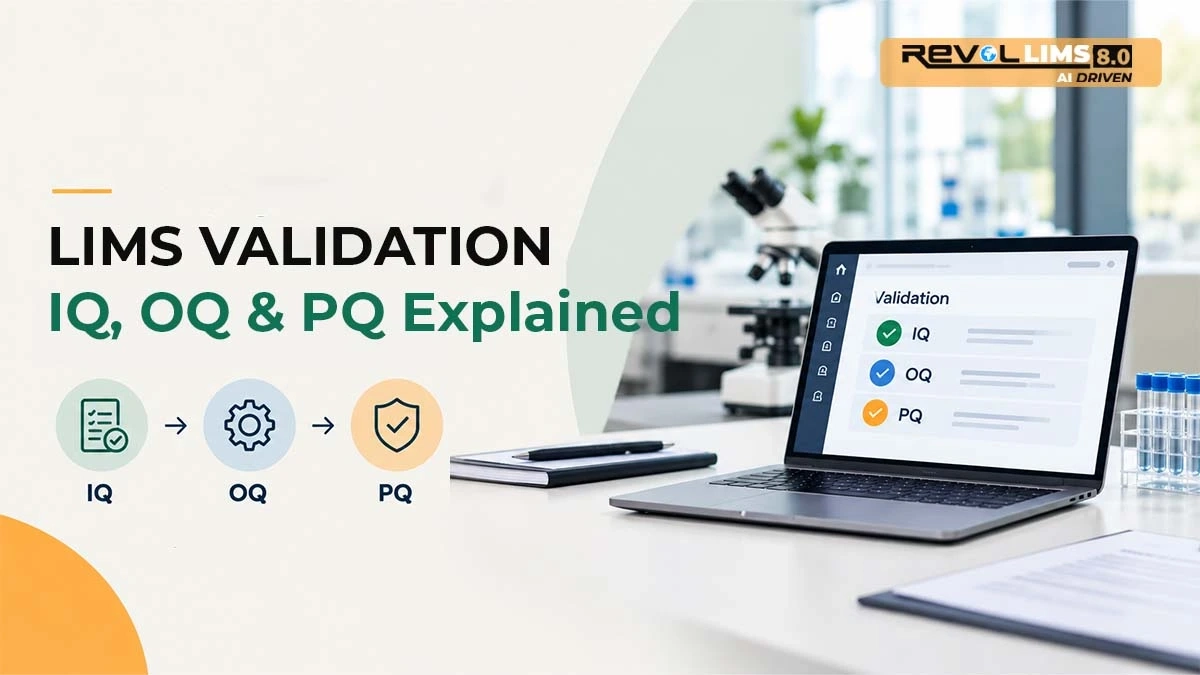
Validation Planning (Regulated Laboratories) develops Installation Qualification (IQ) protocol, creates Operational Qualification (OQ) test scripts, prepares Performance Qualification (PQ) scenarios, and assigns validation execution responsibilities.
Installation Qualification verifies software installation per specifications, confirms hardware meets requirements (on-premise), validates network and security configuration, documents system configuration settings, and obtains IQ completion approval.
Operational Qualification tests all functional requirements systematically, validates workflows operate as designed, verifies calculations and formulas, tests security and access controls, documents OQ test results, and addresses failures or deviations.
User Acceptance Testing recruits representative users for testing, provides test scenarios and scripts, observes users completing realistic workflows, gathers feedback on usability and functionality, documents issues and enhancement requests, and prioritises fixes before go-live.
Week 7 Deliverables:
IQ protocol completion, OQ test execution results, and UAT feedback documentation.
Week 8 Activities:
Performance Qualification tests system with real laboratory workflows, validates complete sample lifecycle scenarios, tests concurrent users and load conditions, verifies reporting accuracy and completeness, documents PQ test results, and obtains final validation approval.
Issue Resolution addresses critical issues identified during testing, prioritises and fixes high-priority bugs, documents workarounds for minor issues if needed, retests fixes to verify resolution, and obtains user confirmation of fixes.
Final Configuration Refinement incorporates feedback from testing, optimises workflows based on user input, updates reports and templates as needed, adjusts system settings for performance, and freezes configuration for go-live.
Validation Documentation compiles the validation package (IQ, OQ, PQ), prepares a validation summary report, obtains final quality assurance approval, and archives validation documentation.
Week 8 Deliverables:
Complete validation package, resolved critical issues, finalised system configuration, and validation approval for go-live.
Weeks 9-10: Training and Go-Live Preparation
Week 9 Activities:
Training Material Finalisation completes user training guides and quick reference cards, prepares system administrator documentation, creates video tutorials for common tasks, develops a frequently asked questions document, and prints or distributes training materials.
Administrator Training trains designated system administrators, covers system configuration and maintenance, demonstrates user management and security, teaches troubleshooting common issues, and practices backup and disaster recovery.
Super User Training trains power users from each laboratory area, provides in-depth training on advanced features, prepares them to support colleagues, demonstrates system administration tasks, and enlists them as champions for adoption.
End User Training schedules training sessions for all laboratory staff, delivers role-based training programs, provides hands-on practice time, addresses questions and concerns, and assesses training effectiveness.
Week 9 Deliverables:
Complete training materials, trained administrators and super users, and training completion for all end users.
Week 10 Activities:
Go-Live Readiness Assessment verifies all system configuration is complete, confirms testing and validation are finished, validates all users are trained, reviews open issues and confirms none are blocking, assesses data migration readiness, and evaluates infrastructure and support readiness.
Final Data Migration executes production data migration, validates data accuracy in production, performs final data reconciliation, obtains stakeholder approval of migrated data, and freezes the legacy system for archival.
Go-Live Preparation communicates the go-live date to all stakeholders, prepares support resources for go-live period, establishes escalation procedures, configures production monitoring and alerting, schedules extended support coverage, and prepares rollback plan if needed.
Production Environment Setup finalizes production system configuration, implements backup and disaster recovery, configures monitoring and alerting, validates security settings, and performs final production testing.
Week 10 Deliverables:
Production data migrated and validated, go-live readiness approved, support plan activated.
Weeks 11-12: Go-Live and Hypercare
Week 11 Activities:
Go-Live transitions to production LIMS operation, processes first samples in production system, monitors system performance closely, provides on-site support for users, addresses issues immediately as they arise, and celebrates go-live milestone with team.
Hypercare Support maintains extended support hours, monitors system usage and adoption, addresses user questions quickly, identifies and resolves issues rapidly, communicates status to stakeholders daily, and adjusts workflows if needed.
Workflow Optimisation observes users working in the new system, identifies opportunities for improvement, makes minor configuration adjustments, provides additional training where needed, and gathers ongoing feedback.
Production Monitoring monitors system performance and availability, tracks key metrics (samples processed, turnaround time, error rates), validates data accuracy and completeness, ensures backups are executing properly, and reports status to leadership.
Week 11 Deliverables:
Successful go-live execution, operational production system, initial usage metrics.
Week 12 Activities:
Stabilisation transitions from hypercare to standard support, addresses remaining issues and enhancements, finalises any outstanding training, validates all workflows operating smoothly, and measures success against original objectives.
Documentation Finalisation completes as-built documentation, updates standard operating procedures, finalises user training materials, documents lessons learned, and archives implementation project documentation.
Project Closeout conducts a final project review meeting, measures achievement of objectives, documents successes and improvement opportunities, celebrates team accomplishments, transitions to ongoing support and enhancement, and closes the implementation project formally.
Success Measurement measures key performance indicators, compares pre and post-implementation metrics, validates ROI projections, gathers user satisfaction feedback, and reports results to stakeholders.
Week 12 Deliverables:
Stable production operation, final project documentation, lessons learned report, and success metrics report.
Critical Success Factors for LIMS Implementation
Certain factors consistently differentiate successful implementations from troubled projects.
Executive Sponsorship and Organisational Commitment
Strong executive sponsorship proves essential for implementation success. The executive sponsor provides visible leadership support, communicating project importance, secures necessary budget and resources without hesitation, makes timely decisions preventing project delays, removes organisational obstacles blocking progress, holds team accountable for deliverables, and celebrates milestones, maintaining momentum.
Without genuine executive sponsorship, projects struggle to secure resources, resolve conflicts, overcome resistance, and maintain priority when competing initiatives emerge.
Effective Executive Sponsorship Behaviours:
Attends project kickoff and major milestone meetings, reviews project status regularly (at least monthly), communicates implementation importance to the broader organisation, intervenes when issues escalate, makes decisions quickly when requested, and recognises team contributions publicly.
User Engagement and Change Management
The human element determines implementation success more than technical factors. Early and continuous user engagement ensures the system meets real operational needs, identifies potential issues before they become problems, builds user ownership and commitment, reduces resistance to change, and accelerates adoption post-go-live.
Effective User Engagement Strategies:
Include users on the implementation team, conduct regular working sessions to gather input, demonstrate the system regularly showing progress, address user concerns promptly and seriously, and celebrate quick wins demonstrating value.
Change Management Principles:
Communicate early and often about the implementation, explain the business case and benefits clearly, address fears and concerns honestly, provide adequate training and support, recognise that change creates discomfort, allow time for adaptation, celebrate successes and acknowledge challenges, and involve users in solution design.
Realistic Scope and Timeline Management
Scope creep represents a primary cause of implementation delays and cost overruns. Establishing a realistic scope prevents trying to implement everything simultaneously, focuses initial deployment on core essential functionality, defers nice-to-have features to post-implementation phases, and delivers incremental value building toward the complete vision.
Scope Management Techniques:
Document scope baseline clearly at project start, establish change control process for scope modifications, require executive sponsor approval for scope changes, assess impact of requested changes on timeline and budget, defer non-essential requests to future phases, and communicate scope boundaries to all stakeholders.
Realistic Timeline Characteristics:
Accounts for actual team availability and time commitments, includes buffer time for addressing unexpected issues, acknowledges dependencies between activities, allows adequate time for testing and validation, provides sufficient training before go-live, and resists pressure to compress timeline unrealistically.
Vendor Partnership and Support
The LIMS vendor serves as a partner throughout implementation. Establishing an effective partnership ensures the vendor deeply understands your requirements, provides experienced implementation resources, offers responsive support addressing issues quickly, shares knowledge enabling your team's self-sufficiency, and commits to your implementation success.
Effective Vendor Partnership Behaviours:
Assign an experienced implementation consultant, maintain a consistent vendor team throughout the project, respond to questions and issues promptly, proactively identify potential problems, share best practices from other implementations, provide regular status updates, and deliver services per the agreed timeline.
Red Flags in Vendor Relationships:
Frequent turnover in assigned implementation staff, slow response to questions and issues, pushing responsibility for delays onto the laboratory, delivering incomplete or poor quality services, resisting reasonable requests for changes or support, and misaligned expectations about deliverables.
Comprehensive Testing and Validation
Thorough testing prevents disastrous go-live failures. Adequate testing validates the system meets all requirements, identifies bugs and issues before production, builds user confidence in system reliability, satisfies regulatory validation requirements, and reduces support burden post-go-live.
Testing Best Practices:
Test early and test often throughout implementation, involve end users in testing activities, test complete workflows end-to-end, test with realistic data and scenarios, document all testing systematically, address issues before proceeding, and retest fixes to verify resolution.
For regulated laboratories, formal validation following established protocols is non-negotiable. Under-investing in validation creates compliance risk and potential regulatory findings.
Training Quality and Completeness
Training determines how quickly users become productive and how successfully they adopt the new system. Effective training is role-based, addressing what each user actually does, hands-on, allowing practice in a real environment, scenario-based using realistic examples, repeatable with materials users can reference later, and adequate, providing sufficient time for learning.
Training Delivery Methods:
Instructor-led sessions for initial comprehensive training, hands-on workshops practising real scenarios, video tutorials for just-in-time learning, written quick reference guides, and online knowledge bases for self-service support.
Training Adequacy Indicators:
Users can complete their primary tasks independently, users understand where to find help when needed, user questions decrease over time, users express confidence in their abilities, and adoption metrics show consistent system usage.
Common LIMS Implementation Challenges and Solutions
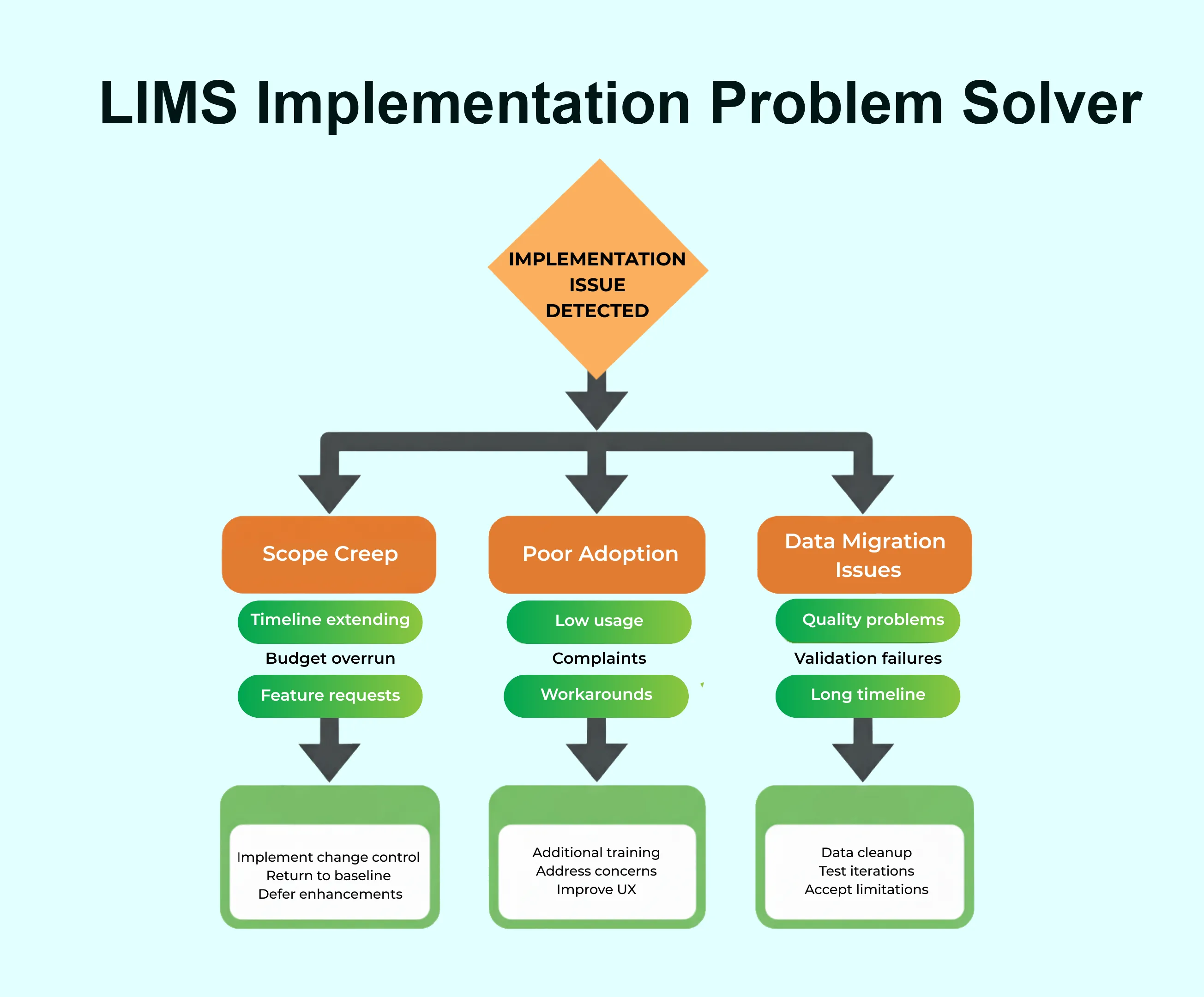
Understanding typical challenges enables proactive mitigation.
Challenge 1: Resistance to Change
Symptom: Users resist adopting the new system, preferring familiar manual processes. Complaints that LIMS is harder/slower than spreadsheets. Low system usage post-go-live.
Root Causes: Fear of technology or change, lack of understanding of benefits, inadequate training or support, and poor user experience design.
Solutions:
Communicate benefits clearly and repeatedly, involve users in design decisions, provide excellent training and support, celebrate early adopters as champions, demonstrate quick wins showing value, address concerns with empathy, make the system as intuitive as possible, and provide adequate time for the learning curve.
Prevention:
Begin change management early in the project, engage users throughout implementation, communicate frequently and transparently, and recognise that change requires emotional adjustment.
Challenge 2: Scope Creep and Feature Bloat
Symptom: Project timeline extends beyond the original plan. Implementation costs exceed the budget. Go-live date postponed repeatedly.
Root Causes: Poorly defined initial requirements, lack of prioritisation, attempting too much simultaneously, and a weak change control process.
Solutions:
Return to the original objectives and requirements baseline, categorise requests as critical vs. enhancement, defer non-critical items to post-implementation, implement strict change control requiring approval, and communicate scope boundaries clearly.
Prevention:
Document comprehensive requirements upfront, prioritise requirements rigorously, establish formal change control from project start, and resist the temptation to add just one more thing.
Challenge 3: Data Migration Difficulties
Symptom: Data migration takes longer than expected. Significant data quality issues discovered. Migrated data fails validation checks.
Root Causes: Underestimating data cleanup required, poor understanding of source data, inadequate mapping from old to new system, and insufficient testing of migration.
Solutions:
Allocate dedicated time for data cleanup, involve data owners in mapping decisions, test migration multiple times before production, validate data thoroughly after migration, and accept that perfect data migration is rarely achievable.
Prevention:
Assess data quality early in the project, build cleanup time into the schedule, plan for iterative migration testing, and consider whether all historical data must migrate.
Challenge 4: Integration Complexity
Symptom: Instrument integrations are not working properly. Data flow between systems fails or is corrupted. Integration development is consuming excessive time.
Root Causes: Underestimating integration difficulty, inadequate technical documentation, legacy systems with poor integration capabilities, and insufficient testing of integrated workflows.
Solutions:
Engage vendor integration specialists, obtain detailed technical specifications, allocate adequate time for integration development and testing, plan fallback manual procedures if needed, and prioritise critical integrations for initial deployment.
Prevention:
Assess integration requirements early, obtain technical documentation from vendors, budget adequately for integration development, and plan phased integration deployment.
Challenge 5: Inadequate Training
Symptom: Users cannot perform basic tasks. Excessive support calls post-go-live. Users are expressing frustration with the system.
Root Causes: Insufficient training time allocated, training too early before go-live (forgotten), training not role-specific, and a lack of practice opportunity.
Solutions:
Provide refresher training closer to go-live, create role-specific training programs, allow hands-on practice time, develop quick reference materials, and provide extended support post-go-live.
Prevention:
Allocate adequate time for training, schedule training appropriately before go-live, provide multiple training formats, and assess training effectiveness.
Challenge 6: Unrealistic Timeline Expectations
Symptom: Project consistently behind schedule. Team members are overwhelmed. Quality suffers due to rushing.
Root Causes: Underestimating complexity, insufficient team availability, dependencies not accounted for, and pressure from management.
Solutions:
Revise timeline based on reality, secure additional resources if possible, extend timeline rather than compromise quality, communicate honestly about status, and identify activities that can be deferred.
Prevention:
Develop a realistic timeline from the outset, build buffer time into the schedule, assess team availability honestly, and resist pressure to commit to an aggressive timeline.
Challenge 7: Poor Vendor Communication
Symptom: Vendor not responding to questions. Implementation deliverables are late or incomplete. Misaligned expectations about scope.
Root Causes: Unclear contract terms, inadequate vendor resources, mismatched expectations, and poor project management.
Solutions:
Escalate concerns to vendor management, request different implementation resources, clarify expectations and deliverables, document issues formally, and consider contractual remedies if severe.
Prevention:
Select vendor carefully with reference checks, establish clear contract terms, define deliverables specifically, establish communication protocols, and maintain regular status meetings.
Post-Implementation: Ensuring Long-Term Success
Go-live represents a beginning, not an ending. Long-term LIMS success requires ongoing attention, optimization, and governance.
Stabilization Phase (Months 1-3 Post Go-Live)
Immediate Post-Go-Live Activities:
Extended Support Coverage maintains elevated support hours (extended hours, weekend coverage if needed), monitors system usage and performance closely, addresses issues rapidly with short resolution timeframes, tracks common questions indicating training gaps, and provides on-site support if beneficial.
Issue Tracking and Resolution maintains comprehensive issue log, categorizes issues by severity and priority, addresses critical issues immediately, plans resolution for lower-priority items, and communicates status transparently.
Quick Win Optimization identifies small improvements delivering immediate value, adjusts workflows based on real usage, modifies reports based on user feedback, optimizes system settings for performance, and implements enhancements approved pre-go-live.
Adoption Monitoring tracks system usage metrics, monitors completion of workflows in LIMS, identifies users struggling with adoption, provides targeted additional training, and celebrates adoption milestones.
Continuous Improvement (Ongoing)
Regular System Reviews conduct monthly review of system performance, analyze usage patterns and bottlenecks, gather user feedback systematically, identify enhancement opportunities, and prioritize improvements for implementation.
Performance Optimization monitor system performance metrics, identify and address performance issues, optimize database queries and reports, manage data archival and purging, and maintain system responsiveness.
Feature Expansion implement deferred nice-to-have features, add new modules or capabilities, expand LIMS to additional laboratory areas, integrate additional instruments or systems, and continuously enhance functionality.
User Feedback Mechanisms establish regular user feedback sessions, create a suggestion submission process, prioritise enhancements based on impact, communicate the roadmap to users, and maintain engagement momentum.
LIMS Governance and Administration
Governance Structure establishes LIMS steering committee (quarterly meetings reviewing strategy, priorities, and major changes), designates system owner (accountable for system performance and direction), assigns super users (supporting colleagues and advocating for improvements), and appoints system administrators (managing day-to-day configuration and maintenance).
Change Management Process requires formal change requests for modifications, assesses the impact of proposed changes, prioritises changes based on value and effort, tests changes before production deployment, documents all configuration changes, and communicates changes to affected users.
System Maintenance applies vendor updates and patches, performs regular database maintenance, monitors system health and performance, manages user accounts and permissions, maintains documentation currency, and conducts periodic disaster recovery testing.
Compliance Maintenance maintains validation documentation current, documents all system changes, conducts periodic self-audits, stays current on regulatory requirements, and prepares for external audits.
Measuring Implementation Success
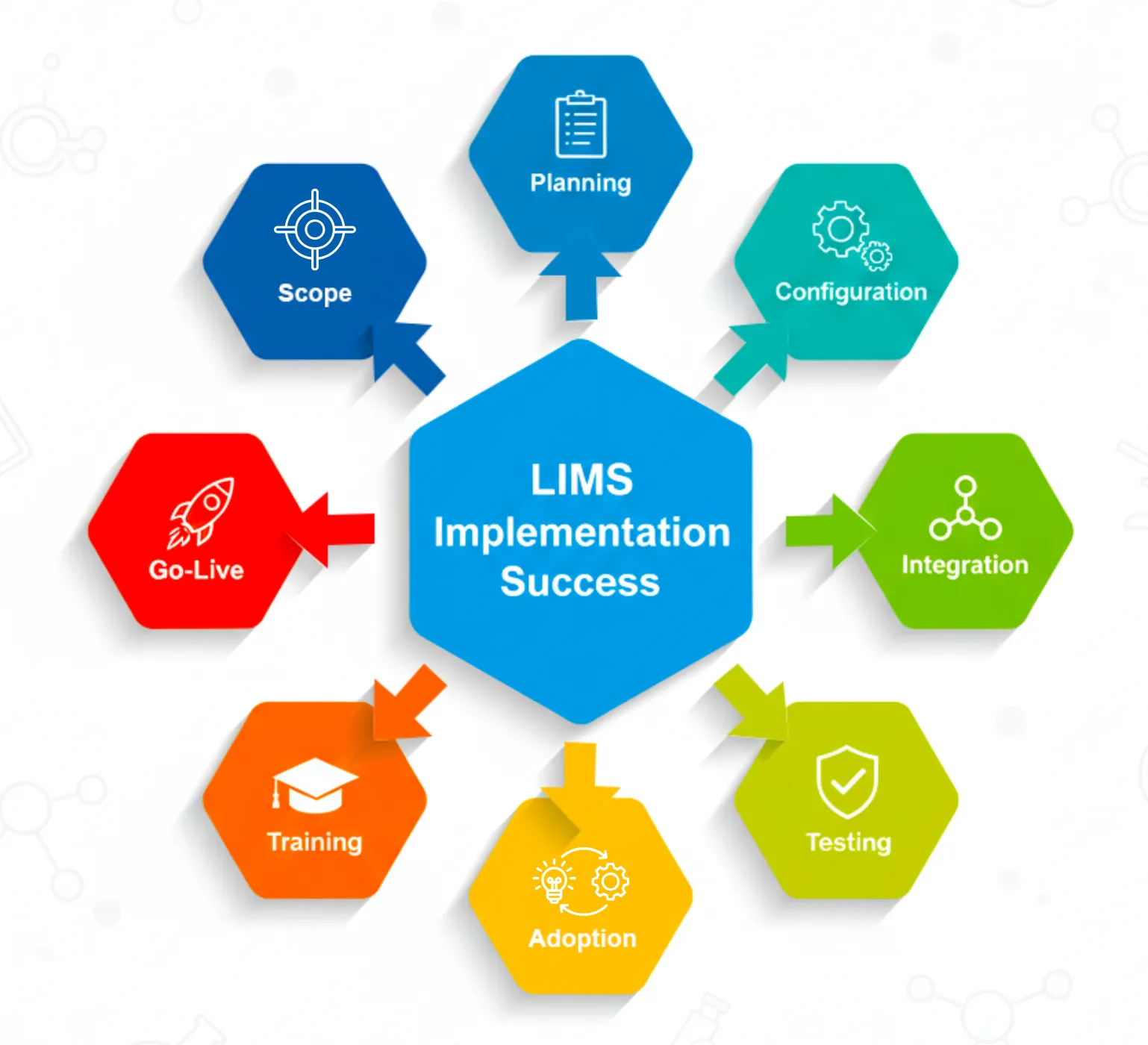
Key Performance Indicators:
Operational Efficiency:
- Sample turnaround time (before vs. after)
- Staff time spent on administrative tasks
- Laboratory testing capacity (samples processed)
- Error rates and rework frequency
- Time spent on report generation
Quality Metrics:
- Data transcription errors
- Audit findings and observations
- Regulatory compliance status
- Quality control performance
- Client complaint rate
User Adoption:
- System login frequency
- Workflow completion in LIMS
- User satisfaction scores
- Support ticket volume and trends
- Training completion rates
Business Impact:
- Return on investment achieved
- Revenue growth enabled
- Client satisfaction scores
- Audit preparation time
- Staff productivity gains
Success Measurement Timeline:
- Month 1: Baseline adoption metrics, identify quick wins achieved.
- Month 3: Measure early efficiency gains, assess training effectiveness.
- Month 6: Comprehensive KPI measurement, calculate preliminary ROI.
- Month 12: Full ROI calculation, validate achievement of objectives.
LIMS Implementation Checklist: Your Complete Reference
Use this comprehensive checklist to track implementation progress and ensure nothing is overlooked.
Pre-Implementation Planning Checklist
Project Foundation:
- Business case approved and budget secured
- Implementation objectives documented and agreed
- Executive sponsor identified and committed
- Project team assembled with clear roles
- Project charter signed and distributed
- Communication plan developed
- Risk register created
- Vendor selected and contract executed
Requirements and Assessment:
- Current workflows documented and mapped
- Requirements gathered from all stakeholders
- Requirements prioritised (must/should/nice to have)
- Regulatory compliance requirements identified
- Data migration needs assessed
- Integration requirements documented
- Infrastructure requirements defined
- Training needs identified
Planning Deliverables:
- Detailed project plan with timeline
- Resource allocation plan
- Budget breakdown and approval
- Data migration strategy
- Integration plan
- Validation plan (if regulated)
- Training plan
- Go-live criteria defined
Configuration and Development Checklist
Core System Setup:
- Organisational structure configured
- User roles and permissions defined
- User accounts created
- Sample types configured
- Test methods established
- Specifications and limits defined
- Naming conventions implemented
- Security settings configured
Workflow Configuration:
- Sample login workflow built
- Test assignment logic configured
- Review and approval pathways established
- QC workflows implemented
- Notification rules configured
- Workflow validation completed
Reporting and Analytics:
- Report templates designed
- Calculations and formulas validated
- Dashboard configurations completed
- Distribution rules established
- Report testing completed
Additional Modules:
- Inventory module configured
- QC module setup completed
- Instrument calibration tracking enabled
- Document management configured
- Client portal activated (if applicable)
Integration and Data Migration Checklist
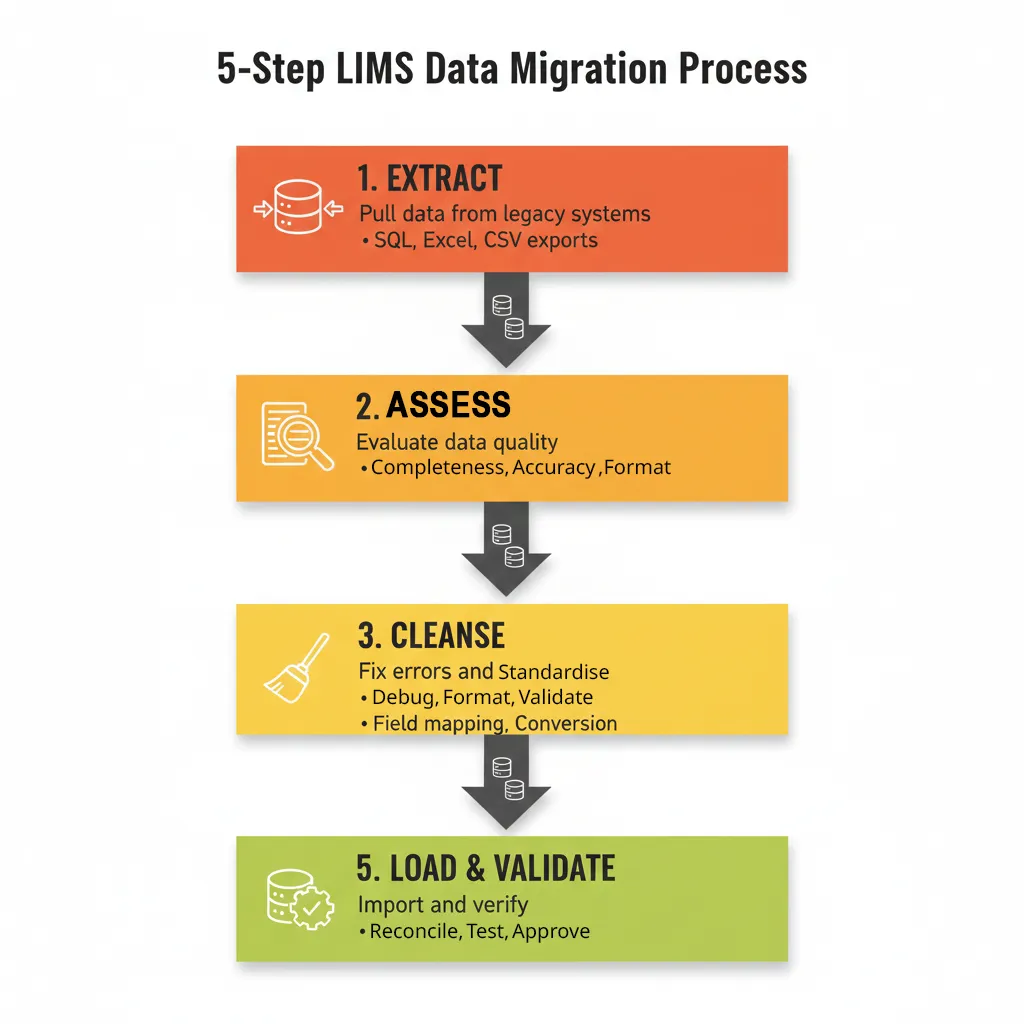
Instrument Integration:
- Priority instruments identified
- Interface specifications obtained
- Instrument connections configured
- Bidirectional communication tested
- Result import validation completed
- Error handling tested
- Integration documentation prepared
Enterprise System Integration:
- ERP/CRM integration requirements defined
- Integration developed and configured
- Data synchronisation tested
- Error handling validated
- Monitoring and alerting configured
Data Migration:
- Source data inventoried
- Data quality assessed
- Data cleanup completed
- Data mapping defined
- Migration scripts developed
- Test migration executed
- Data validation completed
- Production migration plan finalised
Testing and Validation Checklist
System Testing:
- Unit testing completed
- Integration testing finished
- Performance testing conducted
- Security testing completed
- User acceptance testing executed
- All critical issues resolved
Validation (Regulated Laboratories):
- Validation plan approved
- Installation Qualification completed
- Operational Qualification executed
- Performance Qualification finished
- Validation documentation compiled
- QA approval obtained
Training and Go-Live Preparation Checklist
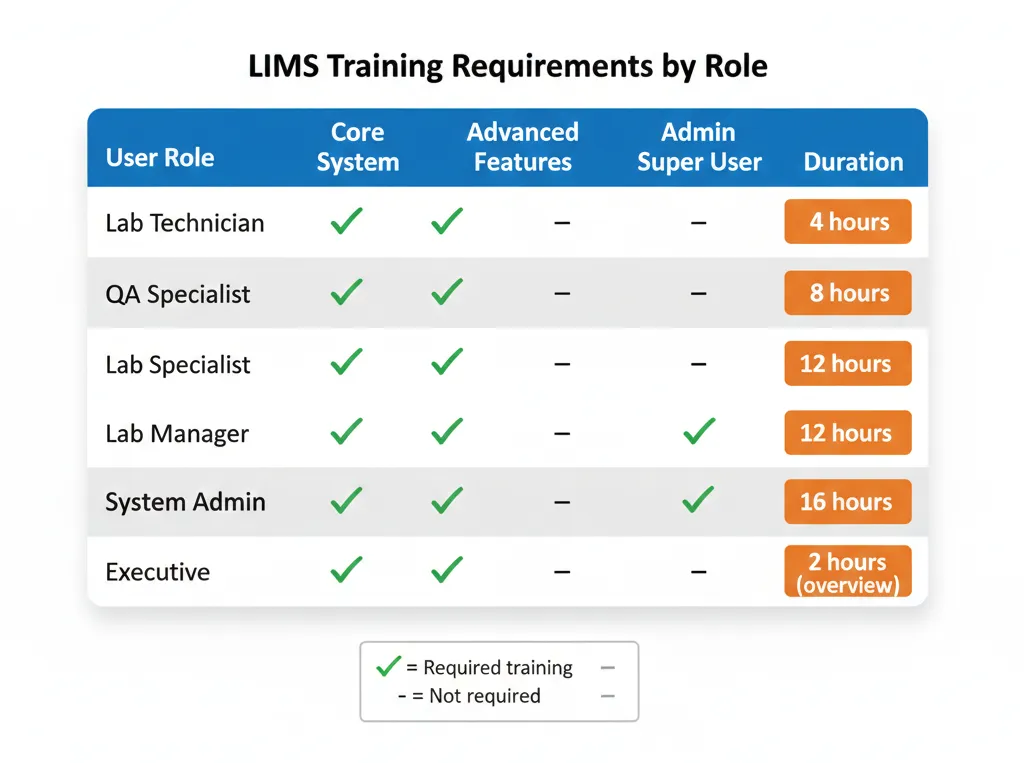
Training:
- Training materials developed
- Administrator training completed
- Super user training finished
- End user training delivered
- Training effectiveness assessed
- Training materials distributed
Go-Live Readiness:
- Configuration complete and frozen
- Testing and validation finished
- All users trained
- Production data migrated and validated
- Support plan activated
- Escalation procedures established
- Monitoring configured
- Rollback plan prepared
- Go-live approval obtained
Go-Live Activities:
- Production system activated
- First samples processed successfully
- Support team deployed
- Stakeholders notified
- Performance monitored
- Issues tracked and resolved
Post-Implementation Checklist
Stabilization:
- Extended support provided
- Issues tracked and resolved
- Workflow optimisations implemented
- User adoption monitored
- Quick wins celebrated
Documentation:
- As-built documentation completed
- Standard operating procedures updated
- Training materials finalised
- Lessons learned documented
- Project closeout report prepared
Success Measurement:
- KPIs measured and reported
- ROI calculated
- User satisfaction assessed
- Objectives achievement validated
- Success communicated to stakeholders
Governance:
- Steering committee established
- Change management process implemented
- Maintenance schedule created
- Enhancement roadmap developed
- Continuous improvement plan activated
Industry-Specific Implementation Considerations
Different laboratory types face unique implementation challenges.
Pharmaceutical Quality Control Laboratories
Unique Requirements:
21 CFR Part 11 compliance for electronic records and signatures, GMP compliance for manufacturing quality systems, stability study management with complex timepoint scheduling, batch genealogy tracking of raw materials through finished products, and deviation and CAPA workflow management.
Implementation Focus:
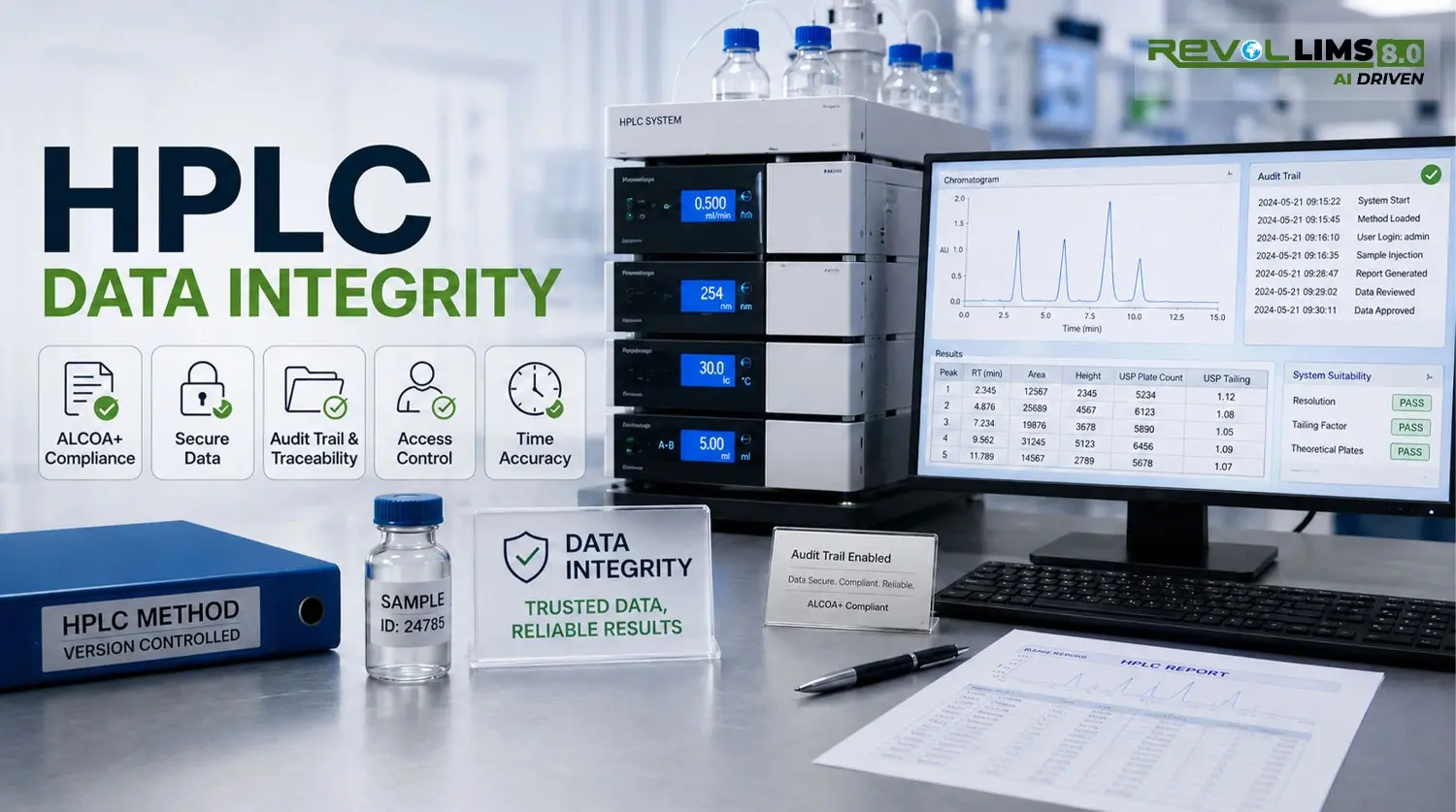
Formal validation following established protocols, a comprehensive audit trail and electronic signature configuration, integration with ERP for batch release, specification management for products and excipients, and thorough documentation for regulatory inspections.
Timeline Impact: Add 2 to 4 weeks for formal validation activities.
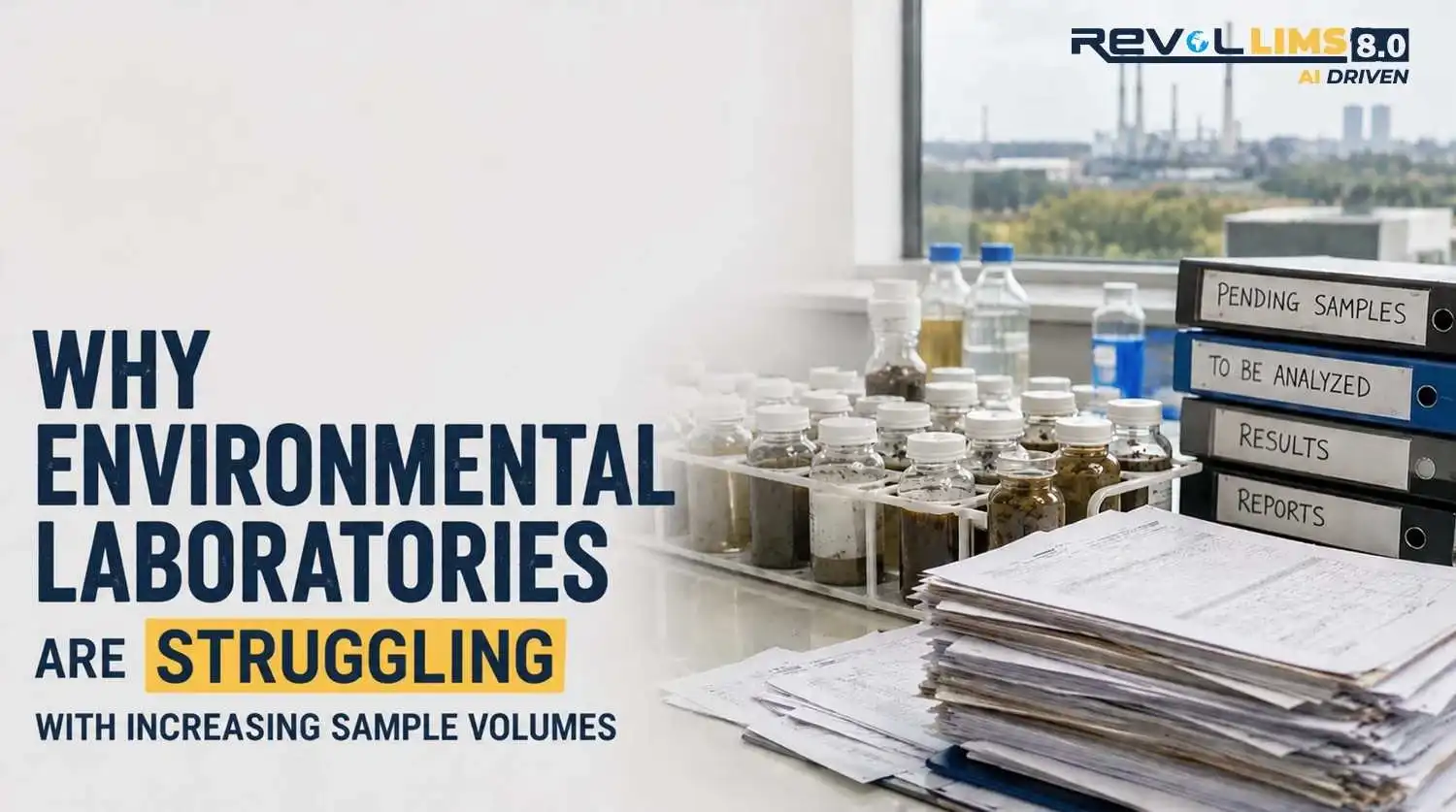
Environmental Testing Laboratories
Unique Requirements:
EPA method compliance with method-specific requirements, field sampling data capture using mobile devices, chain of custody documentation for legal defensibility, multi-site sample consolidation, and compliance reporting for regulatory submissions.
Implementation Focus:
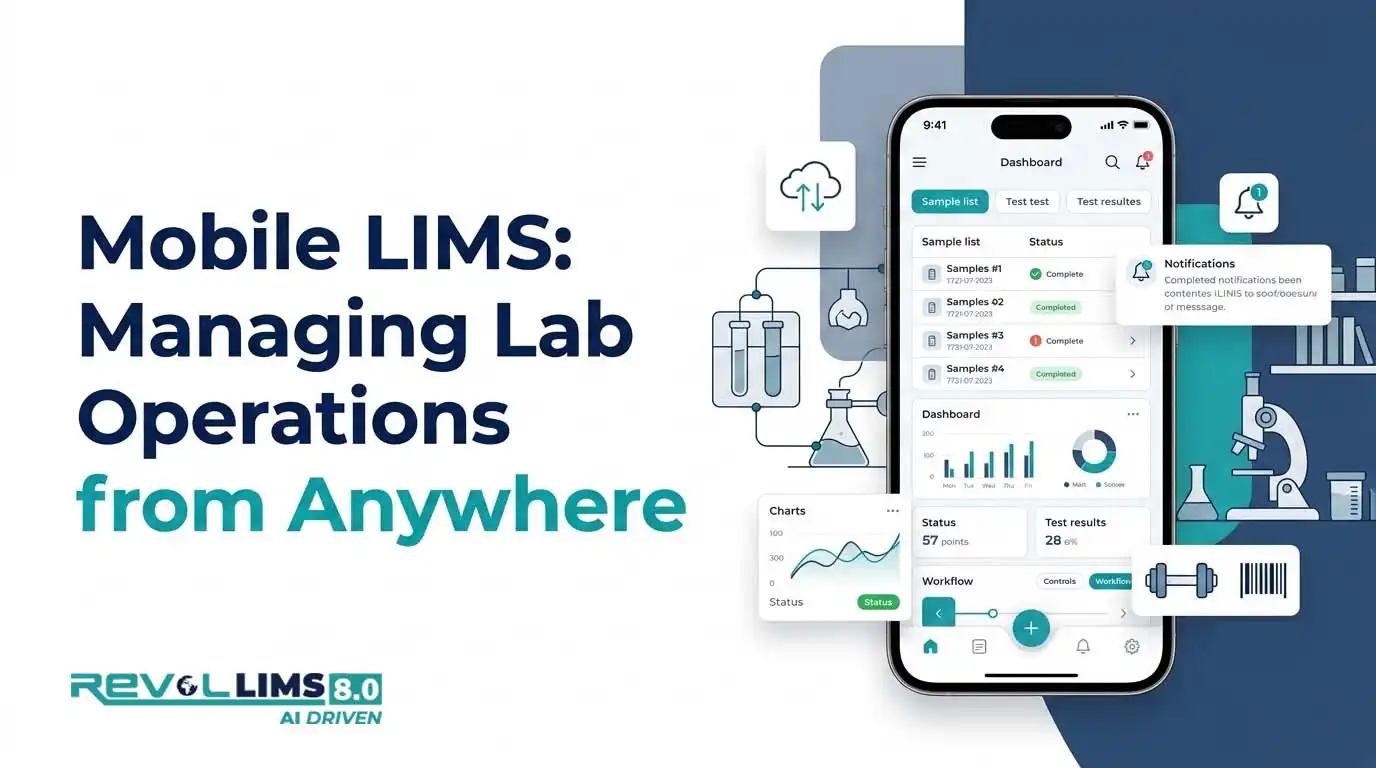
Mobile app deployment for field sampling, method library configuration for EPA methods, geographic sample tracking, holding time and preservation monitoring, and regulatory report generation.
Timeline Impact: Standard timeline with emphasis on mobile implementation.
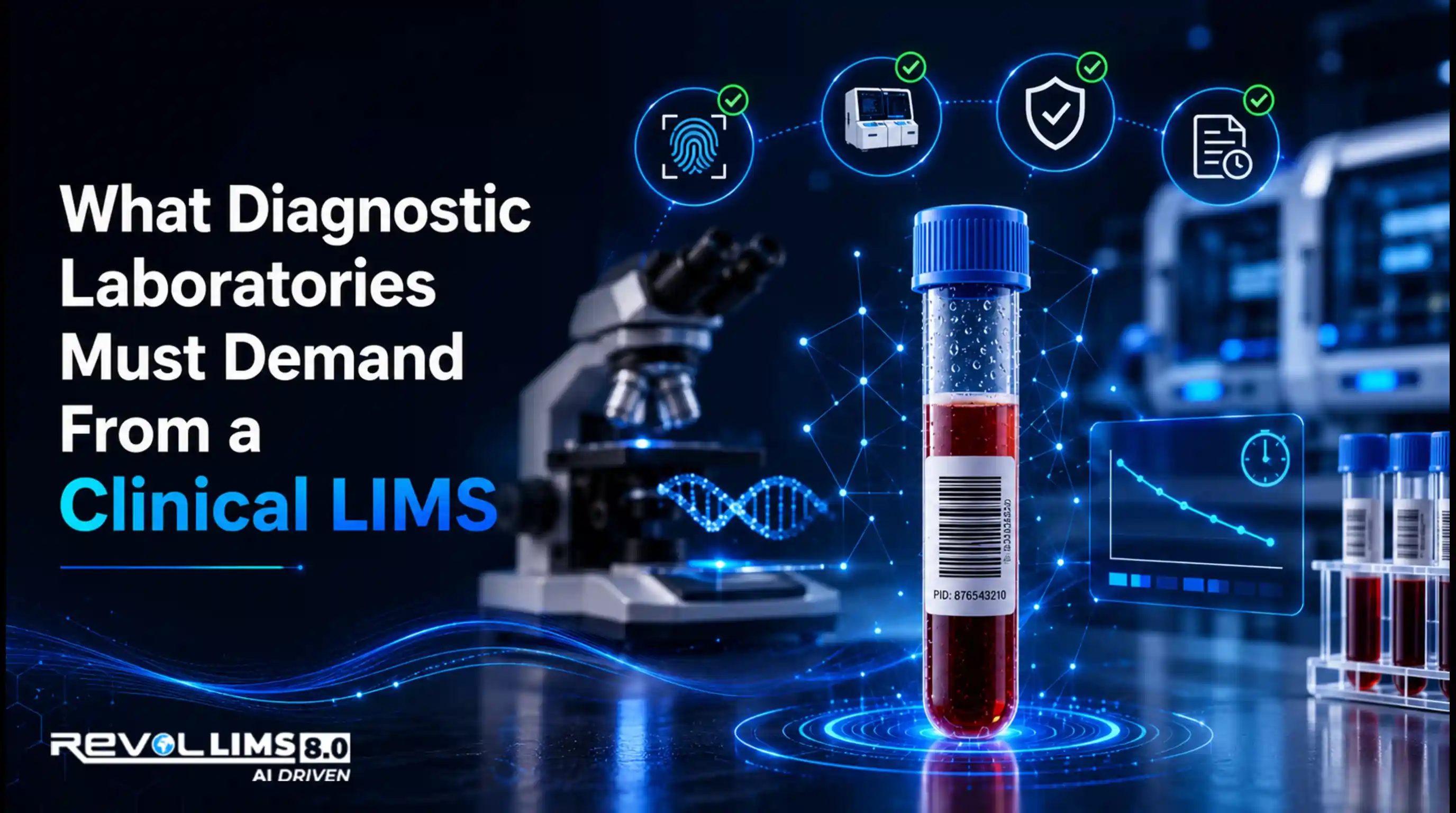
Clinical Diagnostic Laboratories
Unique Requirements:
CLIA compliance for clinical laboratories, HL7 integration with hospital information systems, HIPAA compliance for patient data privacy, result delivery to physicians and EHR systems, and anatomic pathology specimen tracking.
Implementation Focus:
Interface with hospital systems, patient demographic management, reference range configuration, critical result notification, and insurance billing integration.
Timeline Impact: Add 2 to 3 weeks for HL7 integration complexity.
Cannabis Testing Laboratories
Unique Requirements:
State-specific compliance requirements vary by jurisdiction, including seed-to-sale tracking system integration, potency testing with total THC calculations, comprehensive safety testing panels, and metrology compliance for testing laboratory accreditation.
Implementation Focus:
State regulatory compliance configuration, integration with track-and-trace systems, certificate of analysis generation meeting state requirements, cultivator client portal implementation, and rapid turnaround workflow optimisation.
Timeline Impact: Standard timeline with state-specific configuration needs.
Working with Your LIMS Vendor: Maximising the Partnership
The vendor relationship significantly impacts implementation success.
Setting Clear Expectations
Define Deliverables Specifically:
Request a detailed statement of work outlining all deliverables, specify acceptance criteria for each deliverable, establish a timeline with clear milestones, define roles and responsibilities explicitly, and document assumptions and dependencies.
Communication Protocols:
Establish a regular status meeting schedule, define escalation procedures for issues, agree on response time expectations, specify preferred communication channels, and assign single points of contact.
Quality Standards:
Define testing and validation requirements, specify documentation expectations, establish acceptance criteria, agree on issue resolution processes, and clarify warranty and support terms.
Vendor Responsibilities
What to Expect from Your Vendor:
Implementation Services: Experienced implementation consultant assigned to your project, knowledge transfer enabling your self-sufficiency, adherence to agreed timeline and budget, proactive identification of potential issues, and delivery of quality services meeting professional standards.
Technical Support: Responsive support addressing questions and issues, remote access capability for troubleshooting, documentation of issues and resolutions, escalation of complex problems, and post-implementation support transition.
Training: Comprehensive training program delivery, customised training materials, hands-on workshop facilitation, train-the-trainer sessions, and ongoing education resources.
Your Organisation's Responsibilities
What Vendors Need from You:
Resource Availability: Dedicated team members committed to the project, timely decision-making by appropriate stakeholders, subject matter experts available for consultation, IT resources for technical requirements, and executive sponsor engagement.
Project Participation: Active participation in working sessions, timely feedback on deliverables, thorough testing and validation, change request prioritisation, and communication with the broader organisation.
Infrastructure and Access: Network access for the vendor team, test data and system access, integration points and credentials, facilities for on-site work if needed, and collaboration tools and platforms.
Managing Vendor Performance
Tracking Deliverables:
Monitor progress against the agreed timeline, review deliverables for quality and completeness, provide feedback promptly and specifically, escalate concerns early before they compound, and document performance issues formally.
Addressing Performance Issues:
Communicate concerns directly and professionally, provide specific examples of issues, request a corrective action plan with a timeline, escalate to vendor management if needed, and document issues for contractual protection.
Building Strong Partnership:
Treat vendor team as partners, not just contractors, share context about your organisation and objectives, value their expertise and recommendations, celebrate successes together, and maintain a professional, respectful relationship.
LIMS Implementation for Special Scenarios
Some situations require adapted approaches.
Multi-Site LIMS Deployment
Challenges: Coordinating across multiple locations, managing different workflows at different sites, ensuring consistent data and reporting, and phased deployment across locations.
Strategies:
Implement at a pilot site first, establishing a proven approach, document lessons learned for subsequent sites, standardise where possible while allowing site flexibility, establish central governance with site representatives, and deploy in waves, managing complexity.
Timeline Impact: Add 3 to 4 weeks per additional site for phased deployment.
LIMS Migration from Legacy System
Challenges: Extracting data from the old system, maintaining continuity during transition, user adaptation to the new interface, and risk of losing historical data.
Strategies:
Run systems in parallel during the transition period, migrate data in phases, thoroughly, provide extensive training on the new system, maintain read-only access to the legacy system, and plan adequate transition time.
Timeline Impact: Add 4 to 6 weeks for complex data migration and parallel operation.
Rapid LIMS Deployment
When Appropriate: Business urgency (new facility opening, regulatory deadline), simple laboratory workflows, limited integration requirements, or experienced LIMS users.
Accelerated Approach:
Focus on essential must-have functionality only, use vendor pre-configured templates, minimize customization initially, leverage vendor implementation resources heavily, defer nice-to-have features, and plan enhancement phases post-go-live.
Timeline: Aggressive 6 to 8 week deployment possible for simple scenarios.
Risks: Limited stakeholder engagement time, compressed testing and validation, potentially inadequate training, and higher post-go-live support burden.
Enterprise LIMS Implementation
Characteristics: Multiple laboratory locations, diverse laboratory types under a single system, complex integrations across the enterprise, and thousands of users.
Approach:
Establish an enterprise governance structure, standardise where possible across the enterprise, allow controlled variation for legitimate differences, implement in waves by geography or laboratory type, maintain central configuration management, and invest in a comprehensive training program.
Timeline: 6 to 12 months for enterprise-wide deployment.
Conclusion: Your Path to LIMS Implementation Success
LIMS implementation represents a transformative opportunity for your laboratory. When approached with proper planning, realistic expectations, dedicated resources, and structured methodology, implementation delivers remarkable results, eliminating manual inefficiencies, ensuring regulatory compliance, enabling business growth, and positioning your laboratory for long-term success.
This comprehensive guide has provided you with a proven 12-week implementation roadmap, detailed phase-by-phase checklists, practical strategies for common challenges, best practices from successful implementations, and guidance for long-term LIMS success.
Key Takeaways for Success:
Plan Thoroughly: Invest adequate time in pre-implementation planning. Clear objectives, comprehensive requirements, and realistic timelines prevent most implementation problems.
Engage Stakeholders: Involve users early and throughout the project. Their engagement determines adoption success more than any technical factor.
Manage Scope Rigorously: Focus on core essential functionality for initial deployment. Defer enhancements to post-implementation phases.
Partner Effectively: Choose your vendor carefully and establish a strong partnership. Implementation success depends on collaboration.
Test Comprehensively: Allocate adequate time for testing and validation. Issues found in testing are cheaper to fix than in production.
Train Thoroughly: Provide quality training using realistic scenarios and hands-on practice. Adoption requires confident, competent users.
Support Adequately: Plan for extended support during stabilisation. Rapid issue resolution maintains momentum and confidence.
Measure Results: Track key performance indicators validating achievement of objectives and demonstrating return on investment.
Improve Continuously: Treat go-live as a beginning, not an end. Ongoing optimization maximizes long-term value.
Ready to Begin Your LIMS Implementation Journey?
Whether you're implementing your first LIMS, migrating from a legacy system, or expanding to multiple sites, following the structured approach outlined in this guide positions you for success.
Revol LIMS specialises in rapid, successful implementations that deliver results. Our proven methodology, experienced implementation team, and comprehensive support ensure your project succeeds on time and on budget.
Why Choose Revol LIMS for Your Implementation:
Proven 12-Week Deployment: Consistent track record of successful implementations within promised timelines.
Industry-Specific Expertise: Pre-configured solutions for pharmaceutical, environmental, food safety, cannabis, forensic, and chemical testing laboratories.
Comprehensive Support: Dedicated implementation team, extensive training programs, and responsive ongoing support.
Modern Cloud Platform: No infrastructure headaches, automatic updates, and accessible from anywhere.
Regulatory Compliance: Built-in support for ISO 17025, 21 CFR Part 11, GLP, and other standards.
Transparent Pricing:T All-inclusive implementation packages with no hidden costs.
Take the Next Step:
Schedule a Consultation: Discuss your laboratory's specific requirements and implementation timeline.
Request a Demo: See Revol LIMS in action with workflows customised to your laboratory type.
Contact Our Team: Speak with implementation experts about your project.
Request a Demo | Contact us | Explore FeaturesFrequently Asked Questions About LIMS Implementation
Q: How long does LIMS implementation really take?
A: Implementation timelines vary based on deployment type and laboratory complexity. Cloud-based LIMS is typically implemented in 8 to 12 weeks for small to mid-sized laboratories with straightforward workflows. On-premise LIMS add 4 to 8 weeks for infrastructure setup, totalling 12 to 20 weeks. Large enterprise implementations with multiple sites may require 6 to 12 months. Factors affecting timeline include data migration complexity, number of integrations, regulatory validation requirements, team availability, and customisation needs. Revol LIMS specialises in rapid 8 to 12 week implementations using proven methodologies and pre-configured industry templates.
Q: What is the biggest cause of LIMS implementation failure?
A: Poor planning and inadequate stakeholder engagement cause most implementation failures, not technical issues. Specific failure factors include undefined or constantly changing requirements (scope creep), inadequate executive sponsorship and organisational commitment, insufficient user involvement leading to poor adoption, unrealistic timelines creating pressure and rushed decisions, inadequate budget causing resource constraints, poor vendor selection or vendor performance issues, insufficient testing before go-live, and inadequate training leading to frustrated users. Following a structured implementation methodology with proper planning prevents these failures.
Q: How much does LIMS implementation cost?
A: Implementation costs vary significantly based on laboratory size, complexity, and deployment model. Cloud LIMS implementation for small laboratories typically costs $30,000 to $100,000, including software subscription (first year), implementation services, data migration, training, and integration. Medium laboratory implementations range from $75,000 to $250,000. Large enterprise implementations exceed $250,000. On-premise implementations add infrastructure costs of $50,000 to $200,000, plus hardware, networking, and database licenses. Major cost drivers include customisation and integration complexity, data migration scope and quality, validation requirements for regulated laboratories, training program extent, and internal staff time investment. Revol LIMS offers transparent, all-inclusive pricing with no hidden costs.
Q: Do we need to hire consultants for LIMS implementation?
A: Most organisations successfully implement LIMS using vendor professional services without external consultants. LIMS vendors provide experienced implementation specialists, pre-configured industry templates, proven methodologies, comprehensive training programs, and ongoing support. External consultants may add value for very large complex implementations requiring extensive customisation, organisations with no implementation experience needing guidance, laboratories lacking internal resources to dedicate to the project, or highly specialised regulatory requirements. For most laboratories, vendor implementation services prove sufficient and more cost-effective than consultants.
Q: How do we handle laboratory operations during LIMS implementation?
A: Laboratories employ several strategies to maintain operations during implementation. Run the legacy system in parallel during transition, processing all samples in both old and new systems until confidence is established. Implement during slower periods if laboratory volume fluctuates seasonally. Staff implementation team with personnel who can be temporarily backfilled. Use phased deployment, starting with less critical workflows. Implement one day of the week initially, processing Monday samples in LIMS while continuing other days in the legacy system. Plan for slightly reduced throughput during the transition period. Communicate the timeline to clients if the impact is expected. The key is allowing adequate time for the learning curve without attempting a complete instant transition.
Q: What if our laboratory has unique workflows that commercial LIMS cannot accommodate?
A: Modern configurable LIMS platforms accommodate most laboratory workflows without custom coding. What laboratories often perceive as unique workflows typically represent variations of standard processes that LIMS handles through configuration. Revol LIMS offers extensive configuration capabilities through visual tools without programming, industry-specific templates pre-configured for common workflows, a flexible workflow engine adapting to your processes, and custom development for genuinely unique requirements. During vendor selection, demonstrate your specific workflows and verify the vendor can accommodate them through configuration or reasonable customisation. True uniqueness requiring extensive custom development is rare.
Q: How do we ensure our staff actually use the new LIMS?
A: User adoption depends on system usability, training quality, and change management. Strategies ensuring adoption include involving users in vendor selection and implementation, providing excellent role-based training with hands-on practice, demonstrating clear benefits and quick wins, making the system intuitive and easy to use, providing excellent support during transition, addressing concerns and feedback promptly, celebrating early adopters as champions, and establishing the expectation that LIMS is a system of record. Management must reinforce that old manual processes are retired and LIMS is how work gets done. Monitoring adoption metrics identifies users needing additional support.
Q: What happens if we need to change LIMS vendors in the future?
A: While LIMS migration is disruptive, data portability provisions enable transitions if necessary. Before committing to a vendor, verify the contract includes data ownership rights clearly stating you own your data, data export capabilities in standard formats, no penalties or restrictions on data portability, and transition assistance during a reasonable notice period. Maintain documentation of workflows, configurations, and integrations to facilitate potential future migration. Choose established stable vendors to minimize likelihood of forced migration. Many laboratories operate the same LIMS for 10 plus years, so vendor selection is an important long-term decision.
Q: Can we implement LIMS ourselves without vendor services?
A: While possible, self-implementation rarely succeeds for first-time LIMS deployments. LIMS implementation requires specialised expertise in laboratory informatics, software configuration, system integration, validation protocols, and project management. Vendor implementation services provide experienced resources who have implemented systems dozens of times, proven methodologies reducing risk, knowledge of best practices and common pitfalls, comprehensive training programs, and ongoing support during stabilisation. For organisations with extensive LIMS experience and dedicated IT resources, self-implementation may work for simple deployments. For most laboratories, vendor implementation services deliver better, faster results.
Q: How do we validate LIMS for regulatory compliance?
A: Regulated laboratories must follow formal validation protocols documenting that LIMS operates reliably and meets regulatory requirements. Validation typically includes Installation Qualification, verifying software is installed per specifications and system configuration is documented, Operational Qualification testing all functional requirements systematically and documenting test results, and Performance Qualification validating the system works with actual laboratory workflows in production conditions. The process creates validation protocols defining test scenarios and acceptance criteria, executes tests systematically documenting results, investigates and resolves any failures or deviations, compiles a validation package including all protocols and results, and obtains quality assurance approval before production use. Reputable LIMS vendors provide validation protocol templates and documentation packages. Revol LIMS includes comprehensive validation support for regulated laboratories.
Q: What ongoing maintenance does LIMS require after implementation?
A: Post-implementation LIMS maintenance includes user account management (adding users, adjusting permissions, deactivating departed staff), system monitoring and performance optimisation, applying vendor updates and patches, database maintenance and optimisation, backup verification and disaster recovery testing, documentation updates as workflows change, and responding to enhancement requests from users. Cloud LIMS significantly reduces maintenance burden as the vendor handles infrastructure, security patches, software updates, and backup management. On-premise LIMS requires dedicated IT resources for ongoing administration. Most laboratories assign the system administrator role to a laboratory staff member (not full-time) for routine configuration management, while the vendor provides technical support for complex issues.
Published: February 2026
Author: Revol LIMS Implementation Team: The Revol LIMS Implementation Team consists of seasoned laboratory informatics specialists dedicated to helping labs achieve operational excellence. With over 15 years of experience and hundreds of successful implementations worldwide , the team specializes in delivering rapid, AI-powered LIMS solutions tailored to manufacturing, commercial testing, petrochemical, pharmaceutical, environmental, clinical, and forensic laboratories. Our mission is to eliminate manual inefficiencies and ensure global regulatory compliance through a proven, structured deployment methodology.
Category: LIMS Implementation, Laboratory Management, Project Management
Related Articles:
- What is Lims? Complete Guide to Laboratory Information Management Systems
- LIMS Key Features: Essential Capabilities for Modern Laboratories
- Cloud vs On-Premise LIMS: Making the Right Choice
- Successful LIMS Implementation Case Studies
About Revol LIMS
Revol LIMS is an AI-powered, industry-tailored Laboratory Information Management System providing global access with ISO 17025 and FDA 21 CFR Part 11 compliance. Available on-premise or in the cloud (PaaS/SaaS), Revol LIMS serves pharmaceutical, environmental, cannabis, forensic, chemical, and clinical laboratories worldwide with proven 8-12 week implementation timelines, transparent all-inclusive pricing, comprehensive validation support, experienced implementation specialists, and dedicated ongoing support. With 15+ years of experience and hundreds of successful implementations, Revol LIMS helps laboratories achieve operational excellence through modern, AI-powered laboratory management.
Start your LIMS Implementation journey today: www.revollims.com






 (1) (1).webp)